<?xml version="1.0" encoding="utf-8"?>
<feed xmlns="http://www.w3.org/2005/Atom">
  <title>DemoJameson&#39;s Blog</title>
  
  <subtitle>LIFE IS A GAME , SO LEVEL UP</subtitle>
  <link href="https://www.demojameson.com/atom.xml" rel="self"/>
  
  <link href="https://www.demojameson.com/"/>
  <updated>2019-10-17T06:25:00.000Z</updated>
  <id>https://www.demojameson.com/</id>
  
  <author>
    <name>DemoJameson</name>
    
  </author>
  
  <generator uri="https://hexo.io/">Hexo</generator>
  
  <entry>
    <title>自动识别 B 站排行榜类视频中的 av 号</title>
    <link href="https://www.demojameson.com/2017/05/30/bilibili-video-number-ocr/"/>
    <id>https://www.demojameson.com/2017/05/30/bilibili-video-number-ocr/</id>
    <published>2017-05-29T21:21:00.000Z</published>
    <updated>2019-10-17T06:25:00.000Z</updated>
    
    <content type="html"><![CDATA[<img src="/2017/05/30/bilibili-video-number-ocr/cover.jpg" class=""><p><a href="https://www.bilibili.com/index.html">B 站</a>有个非官方的<a href="https://search.bilibili.com/all?keyword=%E5%91%A8%E5%88%8A%E5%93%94%E5%93%A9%E5%93%94%E5%93%A9%E6%8E%92%E8%A1%8C%E6%A6%9C&from_source=video_tag">周刊排行榜</a>做的很好，到现在已经有 362 期持续 7 年了。曾经有段时间视频中的视频编号可以点击跳转到对应的视频，目测是通过高级弹幕实现的，但不知为何后来又没了。为了让自己在看到感兴趣的视频时，免去从全屏状态退出然后手输视频编号的麻烦，写了一个油猴脚本自动提取视频编号，然后在后台打开视频或者在页面上插入视频链接，以便稍后观看。</p><span id="more"></span><h1 id="原理"><a href="#原理" class="headerlink" title="原理"></a>原理</h1><p>通过 canvas 截取 H5 视频中某时刻的部分内容，然后借助 <a href="https://github.com/naptha/tesseract.js">Tesseract</a> 这个 OCR 库来识别图片中的视频编号。</p><h1 id="使用说明"><a href="#使用说明" class="headerlink" title="使用说明"></a>使用说明</h1><ol><li>安装浏览器扩展 <a href="https://tampermonkey.net/">Tampermonkey</a></li><li>安装本工具脚本，<a href="https://openuserjs.org/install/DemoJameson/B_%E7%AB%99%E6%8E%92%E8%A1%8C%E6%A6%9C%E7%B1%BB%E8%A7%86%E9%A2%91%E4%B8%AD_av_%E7%BC%96%E5%8F%B7%E6%8F%90%E5%8F%96%E5%B7%A5%E5%85%B7.user.js">点击安装</a></li><li>打开一个榜单类视频，比如<a href="https://search.bilibili.com/all?keyword=%E5%91%A8%E5%88%8A%E5%93%94%E5%93%A9%E5%93%94%E5%93%A9%E6%8E%92%E8%A1%8C%E6%A6%9C&from_source=video_tag">周刊排行榜</a></li><li>播放视频，按下 <code>Alt+W</code> 键后使用鼠标左键拖拽放手选定视频编号所在的区域（只有当编号所在位置发生变化才需要重新选定区域）</li><li>确认选定的区域包含视频编号（以弹出图片的形式供用户确认）</li><li>回到视频，按下 <code>Alt+Q</code> 键开始识别（初次使用需等待识别库加载数据，大小为 9m，加载进度会显示在浏览器标签页上）</li><li>识别成功后会在后台新标签页打开编号对应的视频，或者在当前页插入链接，或者在评论框插入视频编号标题</li></ol><h1 id="注意事项"><a href="#注意事项" class="headerlink" title="注意事项"></a>注意事项</h1><ul><li>必须使用 HTML5 播放器</li><li>安装完脚本后 Tampermonkey 会自动下载外部依赖的脚本，大小 2.78m，所以如果按快捷键没反应请等等然后刷新页面重试</li><li>首次使用必须下载 9m 大小的 OCR 数据，时间可能有点久（我能怎么办，我也很绝望啊），加载进度会显示在浏览器标签页上</li><li>选择区域和识别的快捷键可定制</li><li>识别成功后执行的操作可开关</li></ul><h1 id="更新记录"><a href="#更新记录" class="headerlink" title="更新记录"></a>更新记录</h1><ul><li>2017年6月20日更新到 v0.2<ol><li>本脚本不支持 Flash 播放器，使用时检测并提示换 HTML5 播放器</li><li>在浏览器标签显示识别进度</li></ol></li><li>2017年12月25日更新到 v0.3<ol><li>因新版 Chrome 浏览器不再支持 dataURI 弹窗，所以改为在本页弹出确认截图</li></ol></li><li>2019年10月17日更新到 v0.4<ol><li>修复因为 Tesseract 更新而不可用的问题</li><li>修复识别成功后获取视频标题失败的问题（番剧类视频依然无法获取标题）</li><li>设置识别区域的快捷键从 <code>Alt+A</code> 改为 <code>Alt+Z</code> </li></ol></li></ul>]]></content>
    
    
    <summary type="html">&lt;img src=&quot;/2017/05/30/bilibili-video-number-ocr/cover.jpg&quot; class=&quot;&quot;&gt;

&lt;p&gt;&lt;a href=&quot;https://www.bilibili.com/index.html&quot;&gt;B 站&lt;/a&gt;有个非官方的&lt;a href=&quot;https://search.bilibili.com/all?keyword=%E5%91%A8%E5%88%8A%E5%93%94%E5%93%A9%E5%93%94%E5%93%A9%E6%8E%92%E8%A1%8C%E6%A6%9C&amp;from_source=video_tag&quot;&gt;周刊排行榜&lt;/a&gt;做的很好，到现在已经有 362 期持续 7 年了。曾经有段时间视频中的视频编号可以点击跳转到对应的视频，目测是通过高级弹幕实现的，但不知为何后来又没了。为了让自己在看到感兴趣的视频时，免去从全屏状态退出然后手输视频编号的麻烦，写了一个油猴脚本自动提取视频编号，然后在后台打开视频或者在页面上插入视频链接，以便稍后观看。&lt;/p&gt;</summary>


    <category term="编程" scheme="https://www.demojameson.com/categories/%E7%BC%96%E7%A8%8B/"/>
    
    
    <category term="工具" scheme="https://www.demojameson.com/tags/%E5%B7%A5%E5%85%B7/"/>
    
    <category term="JavaScript" scheme="https://www.demojameson.com/tags/JavaScript/"/>
    
    <category term="UserScript" scheme="https://www.demojameson.com/tags/UserScript/"/>
    
  </entry>
  
  <entry>
    <title>JSON 转换为 Kotlin Data Class 工具</title>
    <link href="https://www.demojameson.com/2017/05/29/convert-json-to-kotlin-data-class/"/>
    <id>https://www.demojameson.com/2017/05/29/convert-json-to-kotlin-data-class/</id>
    <published>2017-05-29T08:13:00.000Z</published>
    <updated>2017-05-19T08:13:00.000Z</updated>
    
    <content type="html"><![CDATA[<img src="/2017/05/29/convert-json-to-kotlin-data-class/cover.png" class=""><p>在 Kotlin 中数据类（Data Class）能帮我们减少许多样板代码，自动生成 <code>equals</code>/<code>hashCode</code>/<code>toString</code> 等很多必要的方法。与后端通讯时流行的 JSON 数据十分适合用数据类来存储，如果有个工具能自动将 JSON 转化为数据类就好了。所以退化到只会用原生 Javascript DOM 的我就写了这个工具，没有花太多精力只做了点微小的工作（+1s）。</p><span id="more"></span><h1 id="JSON-to-Data-Class-工具"><a href="#JSON-to-Data-Class-工具" class="headerlink" title="JSON to Data Class 工具"></a>JSON to Data Class 工具</h1><textarea style="margin: 10px; width: 600px; height: 300px;" id="json" title="JSON" placeholder="JSON"></textarea><textarea style="margin: 10px; width: 600px; height: 300px;" id='dataclass' title="Data Class" placeholder="Kotlin Data Class"></textarea><input id="convert" type="button" value="转换" onclick="convertJson2DataClass()"/><script type="text/ecmascript">  function convert(parseObj, className, level) {    var result = '';    className = className ? capitalizeFirstLetter(className) + 'Bean' : 'DataClass';    level = level || 1;    var indent = "";    var i = 0;    while (i < level) {      indent += "  ";      i++;    }    <pre><code>if (Array.isArray(parseObj)) &#123;&#125; else if (typeof parseObj === &#39;object&#39;) &#123;  var innerClassArr = [];  result += &#39;\ndata class &#39; + className + &#39;(&#39;;  for (var prop in parseObj) &#123;    var obj = parseObj[prop];    var typeStr = getType(obj, prop);    if (Array.isArray(obj) &amp;&amp; obj.length &gt; 0) &#123;      obj = obj[0];      while (Array.isArray(obj) &amp;&amp; obj.length &gt; 0) &#123;        obj = obj[0];      &#125;      if (!Array.isArray(obj) &amp;&amp; typeof obj === &#39;object&#39;) &#123;        innerClassArr.push(&#123;&#39;obj&#39;: obj, &#39;prop&#39;: prop&#125;);      &#125;    &#125; else if (typeof obj === &#39;object&#39; &amp;&amp; obj != undefined) &#123;      innerClassArr.push(&#123;&#39;obj&#39;: obj, &#39;prop&#39;: prop&#125;);    &#125;    var modifier = typeStr === &#39;Any?&#39; ? &#39;var&#39; : &#39;val&#39;;    result += modifier + &#39; &#39; + prop + &#39;: &#39; + typeStr + &#39;,\n&#39;;  &#125;  result = result.slice(0, -2) + &#39;)&#39;;  if (innerClassArr.length &gt; 0) &#123;    result += &#39; &#123;&#39;;    innerClassArr.forEach(function (data) &#123;      result += &quot;\n&quot; + indent + convert(data.obj, data.prop, ++level);    &#125;);    result += &#39;\n&#39; + indent.slice(2) + &#39;&#125;&#39;;  &#125;&#125;return result;</code></pre><p>  }</p><p>  function getType(obj, prop) {<br>    var typeStr = ‘’;<br>    var typeofResult = typeof obj;</p><pre><code>if (Array.isArray(obj)) &#123;  if (obj.length &gt; 0) &#123;    typeStr = &#39;List&lt;&#39; + getType(obj[0], prop) + &#39;&gt;&#39;;  &#125; else &#123;    typeStr = &#39;List&lt;Any?&gt;&#39;;  &#125;&#125; else if (typeofResult === &#39;object&#39;) &#123;  if (obj != undefined) &#123;    typeStr = capitalizeFirstLetter(prop) + &#39;Bean&#39;;  &#125; else &#123;    typeStr = &quot;Any?&quot;  &#125;&#125; else if (typeofResult === &#39;string&#39;) &#123;  typeStr = &quot;String&quot;;&#125; else if (typeofResult === &#39;boolean&#39;) &#123;  typeStr = &quot;Boolean&quot;;&#125; else if (typeofResult === &#39;number&#39;) &#123;  if (obj.toString().indexOf(&#39;.&#39;) !== -1) &#123;    typeStr = &quot;Double&quot;;  &#125; else &#123;    typeStr = &quot;Int&quot;;  &#125;&#125;return typeStr;</code></pre><p>  }</p><p>  function convertJson2DataClass() {<br>    var jsonText = document.querySelector(‘#json’).value;<br>    if (!jsonText) {<br>      alert(“请先输入 JSON 数据”);<br>      return;<br>    }</p><pre><code>try &#123;  var parseObj = JSON.parse(jsonText);&#125; catch(e) &#123;  alert(&quot;JSON 数据转换异常，请先校验数据是否合法&quot;);  return;&#125;var dataClassText = convert(parseObj).slice(1);document.querySelector(&#39;#dataclass&#39;).value = dataClassText;</code></pre><p>  }</p><p>  function capitalizeFirstLetter(str) {<br>    return str.charAt(0).toUpperCase() + str.slice(1);<br>  }<br></script></p>]]></content>
    
    
    <summary type="html">&lt;img src=&quot;/2017/05/29/convert-json-to-kotlin-data-class/cover.png&quot; class=&quot;&quot;&gt;

&lt;p&gt;在 Kotlin 中数据类（Data Class）能帮我们减少许多样板代码，自动生成 &lt;code&gt;equals&lt;/code&gt;/&lt;code&gt;hashCode&lt;/code&gt;/&lt;code&gt;toString&lt;/code&gt; 等很多必要的方法。与后端通讯时流行的 JSON 数据十分适合用数据类来存储，如果有个工具能自动将 JSON 转化为数据类就好了。所以退化到只会用原生 Javascript DOM 的我就写了这个工具，没有花太多精力只做了点微小的工作（+1s）。&lt;/p&gt;</summary>


    <category term="编程" scheme="https://www.demojameson.com/categories/%E7%BC%96%E7%A8%8B/"/>
    
    
    <category term="Kotlin" scheme="https://www.demojameson.com/tags/Kotlin/"/>
    
    <category term="Java" scheme="https://www.demojameson.com/tags/Java/"/>
    
    <category term="JSON" scheme="https://www.demojameson.com/tags/JSON/"/>
    
  </entry>
  
  <entry>
    <title>【译】Kotlin 类型层级结构一览</title>
    <link href="https://www.demojameson.com/2017/05/29/a-whirlwind-tour-of-the-kotlin-type-hierarchy/"/>
    <id>https://www.demojameson.com/2017/05/29/a-whirlwind-tour-of-the-kotlin-type-hierarchy/</id>
    <published>2017-05-28T21:10:00.000Z</published>
    <updated>2017-05-28T21:10:00.000Z</updated>
    
    <content type="html"><![CDATA[<img src="/2017/05/29/a-whirlwind-tour-of-the-kotlin-type-hierarchy/entire-hierarchy.png" class=""><table><thead><tr><th>作者</th><th>原文</th></tr></thead><tbody><tr><td><a href="http://natpryce.com/bio.html">Nat Pryce</a></td><td><a href="http://natpryce.com/articles/000818.html">A Whirlwind Tour of the Kotlin Type Hierarchy</a></td></tr></tbody></table><p>Kotlin 有大量优秀的<a href="https://kotlinlang.org/docs/reference/">语言文档</a>和<a href="https://kotlinlang.org/docs/tutorials/">教程</a>。但是我没有找到任何描述 Kotlin 类型层级结构（type hierarchy）是如何组成的文章。那真是太可惜了，因为我觉得这个类型系统很棒<sup><a href="#neat">1</a></sup>。</p><p>关于 Kotlin 的类型层级结构只有很少的几条规则需要了解，这些规则一致和可预测地结合在一起。得益于这些规则，Kotlin 可以提供一些有用的语言特性——空安全性（null safety）、多态性（polymorphism）、不可达代码分析（unreachable code analysis），而不需要在编译器和 IDE 中使用一些手段进行特殊处理。</p><span id="more"></span><h1 id="顶层类型"><a href="#顶层类型" class="headerlink" title="顶层类型"></a>顶层类型</h1><p>Kotlin 中所有类型被组织成父类型/子类型（supertype/subtype）关系的层级结构。</p><p>这个层级结构的<strong>顶层</strong>是 <code>Any</code> 类型。例如 <code>String</code> 和 <code>Int</code> 都是 <code>Any</code> 的子类型。</p><img src="/2017/05/29/a-whirlwind-tour-of-the-kotlin-type-hierarchy/any-intrinsics.png" class=""><p><code>Any</code> 相当于 Java 中的 <code>Object</code> 类型。与 Java 不同的是 Kotlin 不区分<strong>原始类型</strong>（primitive type）和其它的类型。它们都是同一类型层级结构的一部分。</p><p>如果定义了一个没有指定父类型的类型，则该类型将是 <code>Any</code> 的直接子类型。</p><figure class="highlight kotlin"><table><tr><td class="code"><pre><span class="line"><span class="class"><span class="keyword">class</span> <span class="title">Fruit</span></span>(<span class="keyword">val</span> ripeness: <span class="built_in">Double</span>)</span><br></pre></td></tr></table></figure><img src="/2017/05/29/a-whirlwind-tour-of-the-kotlin-type-hierarchy/any-user-defined-type.png" class=""><p>如果你为定义的类型指定了父类型，则该父类型将是新类型的直接父类型，并且新类型的最终祖先为 <code>Any</code>。</p><figure class="highlight kotlin"><table><tr><td class="code"><pre><span class="line"><span class="keyword">abstract</span> <span class="class"><span class="keyword">class</span> <span class="title">Fruit</span></span>(<span class="keyword">val</span> ripeness: <span class="built_in">Double</span>)</span><br><span class="line"><span class="class"><span class="keyword">class</span> <span class="title">Banana</span></span>(ripeness: <span class="built_in">Double</span>, <span class="keyword">val</span> bendiness: <span class="built_in">Double</span>): </span><br><span class="line">    Fruit(ripeness)</span><br><span class="line"><span class="class"><span class="keyword">class</span> <span class="title">Peach</span></span>(ripeness: <span class="built_in">Double</span>, <span class="keyword">val</span> fuzziness: <span class="built_in">Double</span>): </span><br><span class="line">    Fruit(ripeness)</span><br></pre></td></tr></table></figure><img src="/2017/05/29/a-whirlwind-tour-of-the-kotlin-type-hierarchy/any-user-defined-type-hierarchy.png" class=""><p>如果你的类型实现了多个接口，那么它将具有多个直接的父类型，而 <code>Any</code> 同样是最终的祖先。</p><figure class="highlight kotlin"><table><tr><td class="code"><pre><span class="line"><span class="class"><span class="keyword">interface</span> <span class="title">ICanGoInASalad</span></span></span><br><span class="line"><span class="class"><span class="keyword">interface</span> <span class="title">ICanBeSunDried</span></span></span><br><span class="line"></span><br><span class="line"><span class="class"><span class="keyword">class</span> <span class="title">Tomato</span></span>(ripeness: <span class="built_in">Double</span>): </span><br><span class="line">    Fruit(ripeness), </span><br><span class="line">    ICanGoInASalad, </span><br><span class="line">    ICanBeSunDried </span><br></pre></td></tr></table></figure><img src="/2017/05/29/a-whirlwind-tour-of-the-kotlin-type-hierarchy/interfaces.png" class=""><p>Kotlin 的类型检查器实施父类型/子类型关系。</p><p>例如你可以将子类型值存储到父类型变量中：</p><figure class="highlight kotlin"><table><tr><td class="code"><pre><span class="line"><span class="keyword">var</span> f: Fruit = Banana(bendiness=<span class="number">0.5</span>)</span><br><span class="line">f = Peach(fuzziness=<span class="number">0.8</span>)</span><br></pre></td></tr></table></figure><p>但是你不能将父类型值存储到子类型变量中：</p><figure class="highlight kotlin"><table><tr><td class="code"><pre><span class="line"><span class="keyword">val</span> b = Banana(bendiness=<span class="number">0.5</span>)</span><br><span class="line"><span class="keyword">val</span> f: Fruit = b</span><br><span class="line"><span class="keyword">val</span> b2: Banana = f</span><br><span class="line"><span class="comment">// Error: Type mismatch: inferred type is Fruit but Banana was expected </span></span><br></pre></td></tr></table></figure><h1 id="可空类型（Nullable-Types）"><a href="#可空类型（Nullable-Types）" class="headerlink" title="可空类型（Nullable Types）"></a>可空类型（Nullable Types）</h1><p>与 Java 不同，Kotlin 区分<strong>非空</strong>（non-null）和<strong>可空</strong>（nullable）类型。到目前为止，我们看到的类型都是<strong>非空类型</strong>，Kotlin 不允许 <code>null</code> 作为这些类型的值。访问<strong>非空类型</strong>的变量将永远不会抛出空指针异常。</p><p>类型检查器拒绝尝试在非空类型上使用 <code>null</code> 或可空类型的代码。</p><p>例如：</p><figure class="highlight kotlin"><table><tr><td class="code"><pre><span class="line"><span class="keyword">var</span> s : String = <span class="literal">null</span></span><br><span class="line"><span class="comment">// Error: Null can not be a value of a non-null type String</span></span><br></pre></td></tr></table></figure><p>如果一个变量存储的值可能为空，则需要使用与值对应的可空类型。例如 <code>String?</code> 类型是与 <code>String</code> 对应的可空类型，<code>String?</code> 类型的变量可以存储任意的 <code>String</code> 值以及 <code>null</code>。</p><figure class="highlight kotlin"><table><tr><td class="code"><pre><span class="line"><span class="keyword">var</span> s : String? = <span class="literal">null</span></span><br><span class="line">s = <span class="string">&quot;foo&quot;</span></span><br><span class="line">s = <span class="literal">null</span></span><br><span class="line">s = bar</span><br></pre></td></tr></table></figure><p>类型检查器能确保你在使用一个可空类型的变量前不会忘记检查是否非空。Kotlin 提供了一些操作符用以便捷的使用可空类型。有关例子请参阅 <a href="https://kotlinlang.org/docs/reference/null-safety.html">Kotlin 语言文档的 Null Safety 部分</a>。</p><p>可空类型具有与对应的非空类型相同的层级结构。例如 <code>String</code> 是 <code>Any</code> 的子类型，则 <code>String?</code> 是 <code>Any?</code> 的子类型；<code>Banana</code> 是 <code>Fruit</code> 的子类型，则 <code>Banana?</code> 是 <code>Fruit?</code> 的子类型。</p><p> <code>Any</code> 是非空类型层级结构的顶层，<code>Any?</code> 则是可空类型层级结构的顶层。因为 <code>Any?</code> 是 <code>Any</code> 的父类型，所以 <code>Any?</code> 是 Kotlin 类型层级结构的最顶端。</p><img src="/2017/05/29/a-whirlwind-tour-of-the-kotlin-type-hierarchy/parallel-nullable-and-non-nullable-hierarchies.png" class=""><p>非空类型是其对应可空类型的子类型。例如 <code>String</code> 作为 <code>Any</code> 的子类型，同时也是 <code>String?</code> 的子类型。</p><img src="/2017/05/29/a-whirlwind-tour-of-the-kotlin-type-hierarchy/nullable-string.png" class=""><p>这就是为什么可以将非空的 <code>String</code> 值存储到可空的 <code>String?</code> 变量中，但是不能将可空的 <code>String?</code> 值存储到非空的 <code>String</code> 变量中。Kotlin 的空安全性不是由特殊规则实施的，而是可空类型与非空类型之间父类型/子类型关系的结果。</p><p>这一规则也适用于自定义的类型。</p><img src="/2017/05/29/a-whirlwind-tour-of-the-kotlin-type-hierarchy/nullable-hierarchy.png" class=""><h1 id="Unit"><a href="#Unit" class="headerlink" title="Unit"></a>Unit</h1><p>Kotlin 是一种表达式导向的语言，所有流程控制语句都是表达式。它没有 Java 和 C 中的 <code>void</code> 函数，函数总是会返回一个值。通常我们为了副作用（side effect）而调用的那些没有实际计算任何东西的函数，将会返回 <code>Unit</code>——一种只有一个值的类型。</p><p>大多数情况下，你不需要明确指定 <code>Unit</code> 作为返回类型或从函数返回 <code>Unit</code>。如果编写的函数具有块代码体，并且不指定返回类型，则编译器会将其视为返回 <code>Unit</code> 类型，否则编译器会使用推断的类型。</p><figure class="highlight kotlin"><table><tr><td class="code"><pre><span class="line"><span class="function"><span class="keyword">fun</span> <span class="title">example</span><span class="params">()</span></span> &#123;</span><br><span class="line">    println(<span class="string">&quot;block body and no explicit return type, so returns Unit&quot;</span>)</span><br><span class="line">&#125;</span><br><span class="line"></span><br><span class="line"><span class="keyword">val</span> u: <span class="built_in">Unit</span> = example()</span><br></pre></td></tr></table></figure><p><code>Unit</code> 并没什么特别之处。就像任何其他类型一样，它是 <code>Any</code> 的子类型，而 <code>Unit?</code> 是 <code>Any?</code> 的子类型。</p><img src="/2017/05/29/a-whirlwind-tour-of-the-kotlin-type-hierarchy/nullable-unit.png" class=""><p>然而 <code>Unit?</code> 类型却是一个奇怪的特殊例子，这是 Kotlin 的类型系统一致性的结果。<code>Unit?</code> 类型只有两个值：<code>Unit</code> 单例和 <code>null</code>。我从来没有发现需要明确使用 <code>Unit?</code> 类型的地方，但是在类型系统中没有特殊的 <code>void</code> 这一事实，使得处理各种函数泛型变得更加容易。</p><h1 id="Nothing"><a href="#Nothing" class="headerlink" title="Nothing"></a>Nothing</h1><p>在 Kotlin 类型层级结构的最底层是 <code>Nothing</code> 类型。</p><img src="/2017/05/29/a-whirlwind-tour-of-the-kotlin-type-hierarchy/nothing.png" class=""><p>顾名思义，<code>Nothing</code> 是没有实例的类型。<code>Nothing</code> 类型的表达式不会产生任何值。</p><p>注意 <code>Unit</code> 和 <code>Nothing</code> 之间的区别，对 <code>Unit</code> 类型的表达式求值将返回 <code>Unit</code> 的单例，而对 <code>Nothing</code> 类型的表达式求值则永远都不会返回。</p><p>这意味着任何类型为 <code>Nothing</code> 的表达式之后的所有代码都是无法得到执行的（unreachable code），编译器和 IDE 会向你发出警告。</p><p>什么样的表达式类型为 <code>Nothing</code> 呢？<a href="https://kotlinlang.org/docs/reference/grammar.html#jump">流程控制中与跳转相关的表达式</a>。</p><p>例如 <code>throw</code> 关键字打断表达式的计算，并从函数中抛出异常。因此 <code>throw</code> 就是 <code>Nothing</code> 类型的表达式。</p><p>通过将 <code>Nothing</code> 作为所有类型的子类型，类型系统允许程序中的任何表达求值失败。这是真实世界的模型，例如 JVM 在计算表达式时内存不足，或者是有人拔掉了计算机的电源插头。这也意味着我们可以从任何表达式中抛出异常。</p><figure class="highlight kotlin"><table><tr><td class="code"><pre><span class="line"><span class="function"><span class="keyword">fun</span> <span class="title">formatCell</span><span class="params">(value: <span class="type">Double</span>)</span></span>: String =</span><br><span class="line">    <span class="keyword">if</span> (value.isNaN()) </span><br><span class="line">        <span class="keyword">throw</span> IllegalArgumentException(<span class="string">&quot;<span class="variable">$value</span> is not a number&quot;</span>) </span><br><span class="line">    <span class="keyword">else</span> </span><br><span class="line">        value.toString()</span><br></pre></td></tr></table></figure><p>你可能会惊奇地发现，<code>return</code> 语句的类型也为 <code>Nothing</code>。<code>return</code> 是一个流程控制语句，它立即从函数中返回一个值，打断其所在表达式的求值。</p><figure class="highlight kotlin"><table><tr><td class="code"><pre><span class="line"><span class="function"><span class="keyword">fun</span> <span class="title">formatCellRounded</span><span class="params">(value: <span class="type">Double</span>)</span></span>: String =</span><br><span class="line">    <span class="keyword">val</span> rounded: <span class="built_in">Long</span> = <span class="keyword">if</span> (value.isNaN()) <span class="keyword">return</span> <span class="string">&quot;#ERROR&quot;</span> <span class="keyword">else</span> Math.round(value)</span><br><span class="line">    rounded.toString()</span><br></pre></td></tr></table></figure><p>进入无限循环或杀死当前进程的函数返回类型也为 <code>Nothing</code>。例如 Kotlin 标准库将 <code>exitProcess</code> 函数声明为：</p><figure class="highlight kotlin"><table><tr><td class="code"><pre><span class="line"><span class="function"><span class="keyword">fun</span> <span class="title">exitProcess</span><span class="params">(status: <span class="type">Int</span>)</span></span>: <span class="built_in">Nothing</span></span><br></pre></td></tr></table></figure><p>如果你编写返回 <code>Nothing</code> 的自定义函数，编译器同样能检查出调用函数后无法得到执行的代码，就像使用语言本身的流程控制语句一样。</p><figure class="highlight kotlin"><table><tr><td class="code"><pre><span class="line"><span class="keyword">inline</span> <span class="function"><span class="keyword">fun</span> <span class="title">forever</span><span class="params">(action: ()-&gt;<span class="type">Unit</span>)</span></span>: <span class="built_in">Nothing</span> &#123;</span><br><span class="line">    <span class="keyword">while</span>(<span class="literal">true</span>) action()</span><br><span class="line">&#125;</span><br><span class="line"></span><br><span class="line"><span class="function"><span class="keyword">fun</span> <span class="title">example</span><span class="params">()</span></span> &#123;</span><br><span class="line">    forever &#123;</span><br><span class="line">        println(<span class="string">&quot;doing...&quot;</span>)</span><br><span class="line">    &#125;</span><br><span class="line">    println(<span class="string">&quot;done&quot;</span>) <span class="comment">// Warning: Unreachable code</span></span><br><span class="line">&#125;</span><br></pre></td></tr></table></figure><p>与空安全一样，不可达代码分析是类型系统的一个特性。无需像 Java 一样在编译器和 IDE 中使用一些手段进行特殊处理。</p><h1 id="可空的-Nothing"><a href="#可空的-Nothing" class="headerlink" title="可空的 Nothing?"></a>可空的 Nothing?</h1><p><code>Nothing</code> 像任何其他类型一样，如果允许其为空则可以得到对应的类型 <code>Nothing?</code>。<code>Nothing?</code> <strong>只能</strong>包含一个值：<code>null</code>。事实上 <code>Nothing?</code> 就是 <code>null</code> 的类型。</p><p><code>Nothing?</code> 是所有可空类型的最终子类型，所以我们可以使用 <code>null</code> 作为任何可空类型的值。</p><img src="/2017/05/29/a-whirlwind-tour-of-the-kotlin-type-hierarchy/nullable-nothing.png" class=""><h1 id="结论"><a href="#结论" class="headerlink" title="结论"></a>结论</h1><p>当你同时考虑这一切时，可能会觉得 Kotlin 的整个类型层级结构相当复杂。</p><img src="/2017/05/29/a-whirlwind-tour-of-the-kotlin-type-hierarchy/entire-hierarchy.png" class=""><p>但不要害怕！</p><p>我希望这篇文章能够证明 Kotlin 有一个简单而一致的类型系统。只有很少的几条规则需要了解：这是一个父类型/子类型关系的层级结构，而 <code>Any?</code> 在顶层，<code>Nothing</code> 在底层，以及非空类型是对应可空类型的子类型。就这么多了，没有其它特殊规则。一些有用的语言特性，如空安全性、面向对象多态性、不可达代码分析都是由这些简单，可预测的规则引起的。得益于这种一致性，Kotlin 的类型检查器是一个强有力的工具，可以帮助你编写简洁正确的程序。</p><hr><p><span id="neat">1. “很棒（neat）” 的意思是 “优雅巧妙高效”，而不是<a href="https://www.youtube.com/watch?v=wvZhW47mGNE">凯文 · 科斯特纳在麦当娜的舞台上表现出的含义</a></span></p>]]></content>
    
    
    <summary type="html">&lt;img src=&quot;/2017/05/29/a-whirlwind-tour-of-the-kotlin-type-hierarchy/entire-hierarchy.png&quot; class=&quot;&quot;&gt;

&lt;table&gt;
&lt;thead&gt;
&lt;tr&gt;
&lt;th&gt;作者&lt;/th&gt;
&lt;th&gt;原文&lt;/th&gt;
&lt;/tr&gt;
&lt;/thead&gt;
&lt;tbody&gt;&lt;tr&gt;
&lt;td&gt;&lt;a href=&quot;http://natpryce.com/bio.html&quot;&gt;Nat Pryce&lt;/a&gt;&lt;/td&gt;
&lt;td&gt;&lt;a href=&quot;http://natpryce.com/articles/000818.html&quot;&gt;A Whirlwind Tour of the Kotlin Type Hierarchy&lt;/a&gt;&lt;/td&gt;
&lt;/tr&gt;
&lt;/tbody&gt;&lt;/table&gt;
&lt;p&gt;Kotlin 有大量优秀的&lt;a href=&quot;https://kotlinlang.org/docs/reference/&quot;&gt;语言文档&lt;/a&gt;和&lt;a href=&quot;https://kotlinlang.org/docs/tutorials/&quot;&gt;教程&lt;/a&gt;。但是我没有找到任何描述 Kotlin 类型层级结构（type hierarchy）是如何组成的文章。那真是太可惜了，因为我觉得这个类型系统很棒&lt;sup&gt;&lt;a href=&quot;#neat&quot;&gt;1&lt;/a&gt;&lt;/sup&gt;。&lt;/p&gt;
&lt;p&gt;关于 Kotlin 的类型层级结构只有很少的几条规则需要了解，这些规则一致和可预测地结合在一起。得益于这些规则，Kotlin 可以提供一些有用的语言特性——空安全性（null safety）、多态性（polymorphism）、不可达代码分析（unreachable code analysis），而不需要在编译器和 IDE 中使用一些手段进行特殊处理。&lt;/p&gt;</summary>


    <category term="编程" scheme="https://www.demojameson.com/categories/%E7%BC%96%E7%A8%8B/"/>
    
    
    <category term="Kotlin" scheme="https://www.demojameson.com/tags/Kotlin/"/>
    
    <category term="Java" scheme="https://www.demojameson.com/tags/Java/"/>
    
  </entry>
  
  <entry>
    <title>Java 与 Kotlin 中各种 findViewById 的方式</title>
    <link href="https://www.demojameson.com/2017/05/22/best-way-to-find-view-by-id/"/>
    <id>https://www.demojameson.com/2017/05/22/best-way-to-find-view-by-id/</id>
    <published>2017-05-21T16:09:00.000Z</published>
    <updated>2017-05-21T16:09:00.000Z</updated>
    
    <content type="html"><![CDATA[<img src="/2017/05/22/best-way-to-find-view-by-id/cover.png" class=""><h1 id="前言"><a href="#前言" class="headerlink" title="前言"></a>前言</h1><figure class="highlight java"><table><tr><td class="code"><pre><span class="line"><span class="keyword">private</span> Button mButton;</span><br><span class="line">...</span><br><span class="line">mButton = (Button) findViewById(R.id.button);</span><br></pre></td></tr></table></figure><p>findBiewById 是 Android 开发中必须使用，但是写起来又很无聊的语句，所以逐渐出现了各种代替它的方式，下面让我们看看都有哪些。</p><span id="more"></span><h1 id="Java-中的方式"><a href="#Java-中的方式" class="headerlink" title="Java 中的方式"></a>Java 中的方式</h1><ol><li><p>从 <a href="https://developer.android.google.cn/topic/libraries/support-library/rev-archive.html">Android Support Library 26.0.0 Beta 1</a> 开始 findViewById 将不再需要强转了。</p><figure class="highlight java"><table><tr><td class="code"><pre><span class="line"><span class="keyword">private</span> Button mButton;</span><br><span class="line">...</span><br><span class="line">mButton = findViewById(R.id.button);</span><br></pre></td></tr></table></figure></li><li><p>使用注解来注入对应类型的 View，最流行的非 <a href="https://jakewharton.github.io/butterknife/">ButterKnife</a> 莫属，搭配 <a href="https://github.com/avast/android-butterknife-zelezny">Android Butterknife Zelezny</a> 插件自动生成以下的代码，不再需要手写 findViewById 了。需要注意的是重构布局时，如果 id 对应的 View 类型发生了变化而又忘记修改代码，则会在运行时产生异常。</p></li></ol>  <figure class="highlight java"><table><tr><td class="code"><pre><span class="line"><span class="meta">@BindView(R.id.button)</span></span><br><span class="line">Button mButton;</span><br></pre></td></tr></table></figure><ol start="3"><li>使用 <a href="https://developer.android.google.cn/topic/libraries/data-binding/index.html">Data Binding Library</a> 自动查找所有 View 并缓存到 binding 实例中以供访问。性能超过手写的 findViewById，因为它只遍历了一遍 XML 布局，而 findViewById 每次都会去遍历 XML 布局；include 布局中的 view 也能同样能访问，并且保留结构。<figure class="highlight java"><table><tr><td class="code"><pre><span class="line">ActivityMainBinding binding = DataBindingUtil.setContentView(<span class="keyword">this</span>, R.layout.activity_main);</span><br><span class="line">binding.button.setText(<span class="string">&quot;DataBinding 是坠吼的&quot;</span>);</span><br><span class="line">binding.include_layout_id.textView.setText(<span class="string">&quot;对对对&quot;</span>);</span><br></pre></td></tr></table></figure></li></ol><h1 id="Kotlin-中的方式"><a href="#Kotlin-中的方式" class="headerlink" title="Kotlin 中的方式"></a>Kotlin 中的方式</h1><p>Java 中的方式 Kotlin 当然也能用了，下面介绍一些 Kotlin 特有的写法。</p><ol><li><p>对应 Java 中的方式 1，并将 View 优化为非空类型。lateinit 关键字代表延迟初始化，假如没有初始化就访问会抛异常。</p><figure class="highlight kotlin"><table><tr><td class="code"><pre><span class="line"><span class="keyword">private</span> <span class="keyword">lateinit</span> <span class="keyword">var</span> button:Button</span><br><span class="line">...</span><br><span class="line">button = findViewById(R.id.button)</span><br></pre></td></tr></table></figure></li><li><p>改为使用 lazy 代理延迟初始化，使用 val 限制属性不可重新赋值，并做些许封装。这时长得就比较像 Java 中的方式 2 了。</p><figure class="highlight kotlin"><table><tr><td class="code"><pre><span class="line"><span class="keyword">private</span> <span class="keyword">val</span> button <span class="keyword">by</span> bindView&lt;Button&gt;(R.id.button)</span><br><span class="line"><span class="comment">// 或者</span></span><br><span class="line"><span class="keyword">private</span> <span class="keyword">val</span> button:Button <span class="keyword">by</span> bindView(R.id.button)</span><br><span class="line">...</span><br><span class="line"><span class="function"><span class="keyword">fun</span> <span class="type">&lt;T : View&gt;</span> Activity.<span class="title">bindView</span><span class="params">(<span class="meta">@IdRes</span> res: <span class="type">Int</span>)</span></span>: Lazy&lt;T&gt; &#123;</span><br><span class="line">    <span class="keyword">return</span> lazy &#123; findViewById&lt;T&gt;(res) &#125;</span><br><span class="line">&#125;</span><br></pre></td></tr></table></figure></li><li><p>使用 <a href="https://kotlinlang.org/docs/tutorials/android-plugin.html">Kotlin Android Extensions</a> 直接生成对应的 View 作为属性。不需要 findViewById，不需要定义变量，直接使用。使用时需要注意访问的 View 属于哪个 Layout，因为智能提示的候选项会提供所有布局中的 View 供你选择，然后帮你 import 对应包以便你访问这个 View；假如 import 的多个同一层级的 layout 中具有相同的 id，则这个 id 对应的 View 将无法访问。</p></li></ol>  <figure class="highlight kotlin"><table><tr><td class="code"><pre><span class="line"><span class="keyword">import</span> kotlinx.android.synthetic.main.activity_kotlin_main.*</span><br><span class="line"><span class="keyword">import</span> kotlinx.android.synthetic.main.activity_kotlin_main.view.*</span><br><span class="line">...</span><br><span class="line">button.setText(<span class="string">&quot;Kotlin Android Extensions 我不太喜欢&quot;</span>)</span><br><span class="line">inflateView.textView.setText(<span class="string">&quot;因为比较混乱，容易出错&quot;</span>)</span><br></pre></td></tr></table></figure><h1 id="小结"><a href="#小结" class="headerlink" title="小结"></a>小结</h1><p>就目前来说，以上这么多方式我最喜欢的还是使用 Data Binding Library，具有性能强，类型安全，结构化等优点。</p>]]></content>
    
    
    <summary type="html">&lt;img src=&quot;/2017/05/22/best-way-to-find-view-by-id/cover.png&quot; class=&quot;&quot;&gt;

&lt;h1 id=&quot;前言&quot;&gt;&lt;a href=&quot;#前言&quot; class=&quot;headerlink&quot; title=&quot;前言&quot;&gt;&lt;/a&gt;前言&lt;/h1&gt;&lt;figure class=&quot;highlight java&quot;&gt;&lt;table&gt;&lt;tr&gt;&lt;td class=&quot;code&quot;&gt;&lt;pre&gt;&lt;span class=&quot;line&quot;&gt;&lt;span class=&quot;keyword&quot;&gt;private&lt;/span&gt; Button mButton;&lt;/span&gt;&lt;br&gt;&lt;span class=&quot;line&quot;&gt;...&lt;/span&gt;&lt;br&gt;&lt;span class=&quot;line&quot;&gt;mButton = (Button) findViewById(R.id.button);&lt;/span&gt;&lt;br&gt;&lt;/pre&gt;&lt;/td&gt;&lt;/tr&gt;&lt;/table&gt;&lt;/figure&gt;

&lt;p&gt;findBiewById 是 Android 开发中必须使用，但是写起来又很无聊的语句，所以逐渐出现了各种代替它的方式，下面让我们看看都有哪些。&lt;/p&gt;</summary>


    <category term="编程" scheme="https://www.demojameson.com/categories/%E7%BC%96%E7%A8%8B/"/>
    
    
    <category term="Android" scheme="https://www.demojameson.com/tags/Android/"/>
    
    <category term="Kotlin" scheme="https://www.demojameson.com/tags/Kotlin/"/>
    
    <category term="Java" scheme="https://www.demojameson.com/tags/Java/"/>
    
  </entry>
  
  <entry>
    <title>游戏《死亡细胞 Dead Cells》道具敌人关卡速查表</title>
    <link href="https://www.demojameson.com/2017/05/21/dead-cells-cheat-sheet/"/>
    <id>https://www.demojameson.com/2017/05/21/dead-cells-cheat-sheet/</id>
    <published>2017-05-20T17:03:00.000Z</published>
    <updated>2017-12-25T15:39:00.000Z</updated>
    
    <content type="html"><![CDATA[<img src="/2017/05/21/dead-cells-cheat-sheet/cover.jpg" class=""><p>给《<a href="http://store.steampowered.com/app/588650/Dead_Cells/">死亡细胞</a>》这个游戏做了个速查表页面，数据来自游戏内解包的文件，<a href="http://www.demojameson.com/deadcells/dead-cells-data.html?lang=zh">点击直达</a>（需要等待一会加载数据）。</p><span id="more"></span><h1 id="简介"><a href="#简介" class="headerlink" title="简介"></a>简介</h1><blockquote><p>欢迎来到《<a href="http://store.steampowered.com/app/588650/Dead_Cells/">死亡细胞</a>》，这是一款将 Roguelite 与银河战士恶魔城类特点融为一炉的 2D 平台动作游戏。游戏中并无检查点，玩家将体验魂味战斗，一路挑战诸多守卫，在杀戮与死亡的反复轮回中探索一座房间不断变化的巨大城堡。</p></blockquote><p>游戏在 5 月 10 日发售后立马获得了好评如潮的评价。虽然目前还是<a href="http://store.steampowered.com/earlyaccessfaq/?snr=1_5_9_">抢先体验</a>状态，但已经有了较为不错的官方中文支持，因为有谜之声和 indienova 的协助汉化。游戏凭借精美的像素风，畅快的打击感，多样的武器和技能再加上 Roguelike 元素，让人百玩不厌。</p><h1 id="速查表"><a href="#速查表" class="headerlink" title="速查表"></a>速查表</h1><p>在花了几天通关（目前只有 11 个不同关卡，两个 BOSS）和收集所有道具后，我尝试挖掘更多的信息，通过 <a href="https://forum.xentax.com/viewtopic.php?f=10&t=16244">QuickBMS</a> 将游戏里的 res.pak 文件解包得到了一些有趣的东西。其中包括描述道具敌人关卡的数据，相关的图标，以及不同语言的文本。于是我将其整理了一下，写了个简单的网页来展示这些信息，充当游戏的速查表。可以了解到游戏道具的掉落率，从何处掉落，关卡的难度级别，掉落物品级别等内容。</p><h1 id="相关工具"><a href="#相关工具" class="headerlink" title="相关工具"></a>相关工具</h1><ol><li><a href="https://forum.xentax.com/viewtopic.php?f=10&t=16244">res.pak 文件解包工具</a></li><li><a href="http://tools.konstruktors.com/">语言文件格式 mo 转换为 po</a></li><li><a href="http://castledb.org/">data.crd 数据预览工具</a>，使用前需先将 data.crd 文件中的 <code>&quot;typeStr&quot;: &quot;17&quot;</code> 批量替换为 <code>&quot;typeStr&quot;: &quot;8&quot;</code></li></ol><h1 id="更新"><a href="#更新" class="headerlink" title="更新"></a>更新</h1><ul><li>2017年6月3日——更新到游戏版本 (<a href="https://steamcommunity.com/app/588650/discussions/4/2741975115066406458/#c1291817837623809239">e2c7b364</a>)<del>，但是解包的资源中没有未编译的文本文件了，所以以后新增的内容只能显示原文法文</del></li><li>2017年6月4日——增加 Loading 界面；裁剪压缩数据文件提高加载速度（3MB 变 100KB）</li><li>2017年6月5日——找到获取文本的方法了，未翻译内容显示英文；添加词缀/附魔列表；添加搜索高亮关键字功能</li><li>2017年6月7日——更新到 <a href="http://steamcommunity.com/app/588650/discussions/4/2741975115066406458/#c1291817837635692966">2017-06-05B (e118994b)</a> 版本</li><li>2017年12月25日——更新到 <a href="steam://openurl_external/http://store.steampowered.com/news/externalpost/steam_community_announcements/2284879949510879205">2017-12-22 (4a8c1404c)</a> 版本，添加开发过程中使用的相关工具说明</li></ul>]]></content>
    
    
    <summary type="html">&lt;img src=&quot;/2017/05/21/dead-cells-cheat-sheet/cover.jpg&quot; class=&quot;&quot;&gt;

&lt;p&gt;给《&lt;a href=&quot;http://store.steampowered.com/app/588650/Dead_Cells/&quot;&gt;死亡细胞&lt;/a&gt;》这个游戏做了个速查表页面，数据来自游戏内解包的文件，&lt;a href=&quot;http://www.demojameson.com/deadcells/dead-cells-data.html?lang=zh&quot;&gt;点击直达&lt;/a&gt;（需要等待一会加载数据）。&lt;/p&gt;</summary>


    <category term="游戏" scheme="https://www.demojameson.com/categories/%E6%B8%B8%E6%88%8F/"/>
    
    
    <category term="dead cells" scheme="https://www.demojameson.com/tags/dead-cells/"/>
    
    <category term="javascript" scheme="https://www.demojameson.com/tags/javascript/"/>
    
  </entry>
  
  <entry>
    <title>朋友，你听说过即刻吗？</title>
    <link href="https://www.demojameson.com/2017/05/11/did-you-hear-of-jike/"/>
    <id>https://www.demojameson.com/2017/05/11/did-you-hear-of-jike/</id>
    <published>2017-05-10T16:43:00.000Z</published>
    <updated>2017-05-27T09:43:00.000Z</updated>
    
    <content type="html"><![CDATA[<img src="/2017/05/11/did-you-hear-of-jike/cover.png" class=""><h1 id="简介"><a href="#简介" class="headerlink" title="简介"></a>简介</h1><blockquote><p>「即刻」是一款基于兴趣的极简信息推送工具。你可以使用「即刻」跟踪一个人或一个事件的最新动态，轻松高效地获取你最关心的信息。用「即刻」，不再错过你惦记的每一件小事！</p></blockquote><p>朋友，你听说过安利吗？呸呸呸……朋友，你听说过「<a href="https://www.ruguoapp.com/">即刻</a>」吗？首次使用「即刻」是在 2016 年，已经忘了是怎么接触到的。之前也用过豌豆荚一览、读读日报、今日头条等资讯聚合类应用，但现在只有「即刻」留在我手机里。</p><p>「即刻」只会推送你订阅的提醒，基本收到的都是你感兴趣的消息，因为他的提醒划分的比较细，不像传统的新闻类应用，只有体育、娱乐、科技等大类予以划分。例如电影相关的提醒，你可以只订阅某位导演甚至某部电影的相关信息。</p><p>「即刻」的提醒除了划分的比较细还有些很个性或者热门的，时常能让人眼前一亮——对对对，这个就是我想要的提醒。像「Breaking News」、「一觉醒来世界发生了什么」、「工作日闹钟设置提醒」等等都不错。</p><span id="more"></span><h1 id="变化"><a href="#变化" class="headerlink" title="变化"></a>变化</h1><p><strong>有何高见，展开讲讲</strong>，是「即刻」评论框的提示文字。刚开始使用「即刻」时我也就一天打开个几次，因为就算订阅了 100+ 个提醒也不会有很多推送。后来推出了评论功能，然后在特别的提醒下总有特别的评论出没，例如「No!PingWest」总是想搞个大新闻膜法师、「新垣结衣最新消息」下一水的“拔剑”，“老婆”、还有随处可见幽默的段子手们。总之氛围挺好发。</p><p><strong>以卡片的形式分享消息</strong>。卡片其实是一张图片，上面包含了原消息的文字和图片，算是一种比链接或者截屏更加直观简洁的分享方式。卡片上面有「即刻」的 Logo 和原消息链接的二维码，无形安利。</p><p><strong>「即刻」没有的提醒我来创建</strong>。「即刻」提供了一系列的机器人帮助用户抓取信息，创建自己想要的提醒。通过不同的组合可以创建一些很有意思的提醒。</p><p>目前有这些机器人，会逐步增加。</p><img src="/2017/05/11/did-you-hear-of-jike/robot.png" class=""><p>我利用这些机器人创建了以下的提醒。订阅人数过低……不能够直接搜索到，如果有感兴趣的可以通过我的用户名 DemoJameson 找到这些提醒。</p><img src="/2017/05/11/did-you-hear-of-jike/subject.png" class=""><p>部分提醒借助了 **<a href="http://ifttj.wong2.me/">IFTTJ</a>**（当年人人网小黄鸡的作者 <a href="https://github.com/wong2">wong2</a> 所写的连接 <a href="https://ifttt.com/">IFTTT</a> 和即刻的工具）来达到翻墙的目的，例如「诚实游戏预告片」。还有部分提醒借助了 <strong><a href="https://feed43.com/">Feed43</a></strong> 来创建 RSS，因为网络上没有适用的信息来源，例如「PS4 系统更新提醒」。</p><h1 id="趣闻"><a href="#趣闻" class="headerlink" title="趣闻"></a>趣闻</h1><ul><li>「即刻」的吉祥物是一只名为“如果”（if 充满 geek 意味的名字）的猫，昵称果果，有自己的专属提醒「即刻九号工友“果果”萌图」。因为整天在这个提醒里晒猫片，吸引了许多人来吸猫，其中就有果果兄长“二猫”的主人。或许是基因的力量太强，二猫主人发现果果十分像自己家那只，一问才知道两只是亲兄弟，都是便利店门口纸箱捡来的。详情请戳《<a href="https://m.okjike.com/messages/581d918d36a4471100e314ec?username=ded76562-1ebd-460c-8878-cf4ebc850b16">世界很小，我在评论区找到了自己的哥哥🐱</a>》</li><li>2016 年 10 月 10 日，有两位用户在即刻一个主题的某条消息留言区相识，一个多月里他们在即刻留下了两千八百多条对话，这些对话完整记录了他们从相知到相恋（现在得加上分手）的过程，单身狗们请移步学习，<a href="https://m.okjike.com/messages/57faf9457cba7f1200e34e75?username=ded76562-1ebd-460c-8878-cf4ebc850b16">戳链接直达</a></li></ul><h1 id="彩蛋"><a href="#彩蛋" class="headerlink" title="彩蛋"></a>彩蛋</h1><p>「即刻」是个有爱应用，隐藏着许多的彩蛋，下面是我收集的部分：</p><ol><li>赞自己和取消赞自己的评论时顶部会出现坏笑表情😏</li><li>「个人主页」顶部的圆形头像可以拖动，安卓版本会有很酷炫的残影</li><li>「设置」-「 向朋友推荐即刻」后选择返回即刻，会出现即刻九号工友果果比心的卡通图</li><li>「设置」界面往上拖会出现 CREATED IN SHANGHAI WITH LOVE 字样以及吉祥物果果，点击还会叫哦</li><li>平时的「即刻小报」最底部会有一只打盹的果果，不过周五那天的小报它就会消失不见留下四个字「TGIF」（Thank God It’s Friday）</li><li>当搜索提醒没有结果时就可以看到果大王</li><li>搜索「果果」选择提醒分类 ，真爱粉才知道（仅 Android 有，记录于即刻 v3.2.3）</li><li>官方创建的提醒右上角可以「报料」，发送报料信息后会送你一只果果（测试了 iPhone 是没有的，记录于即刻 v3.2.3)</li><li>「设置」-「清除缓存」又可以看到果果了（仅 Android 有，记录于即刻 v3.2.3）</li><li>个人主页没有动态的话会有果果</li><li>没有任何消息的提醒也是一只果果镇楼</li></ol><h1 id="后记"><a href="#后记" class="headerlink" title="后记"></a>后记</h1><p>安利了即刻转发到微博后，即刻小秘书给我寄了福利品，有贴纸信封和机器人徽章~</p><img src="/2017/05/11/did-you-hear-of-jike/gift.jpg" class="">]]></content>
    
    
    <summary type="html">&lt;img src=&quot;/2017/05/11/did-you-hear-of-jike/cover.png&quot; class=&quot;&quot;&gt;


&lt;h1 id=&quot;简介&quot;&gt;&lt;a href=&quot;#简介&quot; class=&quot;headerlink&quot; title=&quot;简介&quot;&gt;&lt;/a&gt;简介&lt;/h1&gt;&lt;blockquote&gt;
&lt;p&gt;「即刻」是一款基于兴趣的极简信息推送工具。你可以使用「即刻」跟踪一个人或一个事件的最新动态，轻松高效地获取你最关心的信息。用「即刻」，不再错过你惦记的每一件小事！&lt;/p&gt;
&lt;/blockquote&gt;
&lt;p&gt;朋友，你听说过安利吗？呸呸呸……朋友，你听说过「&lt;a href=&quot;https://www.ruguoapp.com/&quot;&gt;即刻&lt;/a&gt;」吗？首次使用「即刻」是在 2016 年，已经忘了是怎么接触到的。之前也用过豌豆荚一览、读读日报、今日头条等资讯聚合类应用，但现在只有「即刻」留在我手机里。&lt;/p&gt;
&lt;p&gt;「即刻」只会推送你订阅的提醒，基本收到的都是你感兴趣的消息，因为他的提醒划分的比较细，不像传统的新闻类应用，只有体育、娱乐、科技等大类予以划分。例如电影相关的提醒，你可以只订阅某位导演甚至某部电影的相关信息。&lt;/p&gt;
&lt;p&gt;「即刻」的提醒除了划分的比较细还有些很个性或者热门的，时常能让人眼前一亮——对对对，这个就是我想要的提醒。像「Breaking News」、「一觉醒来世界发生了什么」、「工作日闹钟设置提醒」等等都不错。&lt;/p&gt;</summary>


    <category term="软件" scheme="https://www.demojameson.com/categories/%E8%BD%AF%E4%BB%B6/"/>
    
    
    <category term="即刻" scheme="https://www.demojameson.com/tags/%E5%8D%B3%E5%88%BB/"/>
    
  </entry>
  
  <entry>
    <title>无需越狱任意摆放 iPhone 主屏幕应用图标</title>
    <link href="https://www.demojameson.com/2017/04/11/generate-ios-transparent-icon/"/>
    <id>https://www.demojameson.com/2017/04/11/generate-ios-transparent-icon/</id>
    <published>2017-04-11T10:00:00.000Z</published>
    <updated>2017-04-11T10:00:00.000Z</updated>
    
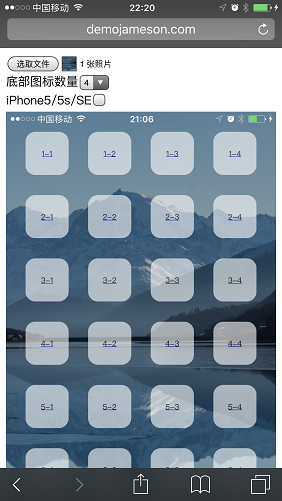
    <content type="html"><![CDATA[<img src="/2017/04/11/generate-ios-transparent-icon/cover.png" class=""><h1 id="简介"><a href="#简介" class="headerlink" title="简介"></a>简介</h1><p>从 Android 转到 iOS 设备总会有些许的不习惯，毕竟可定制性没有那么强。如果 iOS 的主屏幕图标可以像 Android 那样随意摆放就好了，这样既能方便单手使用又能展示壁纸。毕竟不算太小众的需求，早已经<a href="http://iempty.tooliphone.net/">有人实现了</a>，是个在线的工具。可能是外国网站的原因，使用起来不太顺畅上传图片总是失败，终于成功后发现生成的伪透明图标与我手中的 iPhone 7 Plus 不太适配……而且七天过后还得重新上传。所以我就参考它的实现，重写了个无需上传图片到服务器的版本（使用 data URI 生成本地图标页面，代码参（chao）考（xi）自<a href="https://itunes.apple.com/cn/app/%E7%B1%B3%E5%AE%B6-%E7%B2%BE%E5%93%81%E5%95%86%E5%9F%8E-%E6%99%BA%E8%83%BD%E7%94%9F%E6%B4%BB/id957323480?mt=8">米家 App</a> ）。</p><span id="more"></span><h1 id="工具地址"><a href="#工具地址" class="headerlink" title="工具地址"></a>工具地址</h1><p>请使用 iPhone 打开 <a href="/generate-ios-transparent-icon.html"><strong>iOS 透明应用图标伪造工具</strong></a>。</p><h1 id="预览"><a href="#预览" class="headerlink" title="预览"></a>预览</h1><table><thead><tr><th><strong>图标制作工具</strong></th><th><strong>效果图</strong></th></tr></thead><tbody><tr><td><img src="/2017/04/11/generate-ios-transparent-icon/ios_icon_editor.png" class=""></td><td><img src="/2017/04/11/generate-ios-transparent-icon/ios_wallpaper.png" class=""></td></tr></tbody></table><h1 id="原理"><a href="#原理" class="headerlink" title="原理"></a>原理</h1><p>iOS 可以将网页添加到主屏幕，创建一个图标。而这个图标是在网页中指定的，但不能是透明图标。这时我们可以构造一个与所在位置壁纸一模一样的图标，并且图标名为空白，使这个图标看起来就像透明一样。这个伪透明图标的作用就是充当占位符，将我们想要跳过的位置填满。</p><h1 id="使用说明"><a href="#使用说明" class="headerlink" title="使用说明"></a>使用说明</h1><ol><li>设置壁纸时选择<strong>静止</strong>而非<strong>透视</strong></li><li>长按主屏幕中任意应用图标进入排列应用状态</li><li>滑动到最右边的空白新页面</li><li>（可选）如需定制底部 Dock 栏的图标，请先移动其中的应用到其它页面</li><li>同时按住 <strong>Home 键</strong> + <strong>电源键</strong>截取当前没有图标的主屏幕</li><li>用 iPhone 打开 <a href="/generate-ios-transparent-icon.html"><strong>iOS 透明应用图标伪造工具页面</strong></a></li><li>点击<strong>选择文件</strong>，选择<strong>照片图库</strong>，选中刚才的截图，这时会生成各个位置的伪透明图标链接</li><li>根据实际情况选择机型</li><li>（可选）根据需求选择底部 Dock 栏图标数量</li><li>点击需要的伪透明图标链接后会弹出新的页面</li><li>根据提示操作将此页面<strong>添加到主屏幕</strong></li><li>此时主屏幕会多出一个与某位置壁纸一样的应用图标，将此图标移动到指定的位置即可</li><li>重复 10 至 12 直到拼凑出你满意的布局，Enjoy it :)</li></ol><p>点击任一个伪透明应用图标均会跳到本说明页。</p><h1 id="不足之处"><a href="#不足之处" class="headerlink" title="不足之处"></a>不足之处</h1><ul><li>设置壁纸时只能选择<strong>静止</strong>不能选择<strong>透视</strong></li><li>主屏幕选择时会暴露伪透明应用图标的本质</li><li>切换页面时会暴露伪透明应用图标的本质</li><li>双击 Home 键切换应用时会暴露伪透明应用图标的本质</li><li>从其它应用回到主屏幕时会暴露伪透明应用图标的本质</li></ul><h1 id="兼容性"><a href="#兼容性" class="headerlink" title="兼容性"></a>兼容性</h1><ul><li>只测试过 iPhone 5/6/7 三款屏幕部分系统的标准模式和放大模式，而且未对横屏做支持</li><li>如有用户想添加未支持的设备，请发送至少有两行应用图标的主屏幕截图给我 demojameson#gmail.com</li></ul>]]></content>
    
    
    <summary type="html">&lt;img src=&quot;/2017/04/11/generate-ios-transparent-icon/cover.png&quot; class=&quot;&quot;&gt;

&lt;h1 id=&quot;简介&quot;&gt;&lt;a href=&quot;#简介&quot; class=&quot;headerlink&quot; title=&quot;简介&quot;&gt;&lt;/a&gt;简介&lt;/h1&gt;&lt;p&gt;从 Android 转到 iOS 设备总会有些许的不习惯，毕竟可定制性没有那么强。如果 iOS 的主屏幕图标可以像 Android 那样随意摆放就好了，这样既能方便单手使用又能展示壁纸。毕竟不算太小众的需求，早已经&lt;a href=&quot;http://iempty.tooliphone.net/&quot;&gt;有人实现了&lt;/a&gt;，是个在线的工具。可能是外国网站的原因，使用起来不太顺畅上传图片总是失败，终于成功后发现生成的伪透明图标与我手中的 iPhone 7 Plus 不太适配……而且七天过后还得重新上传。所以我就参考它的实现，重写了个无需上传图片到服务器的版本（使用 data URI 生成本地图标页面，代码参（chao）考（xi）自&lt;a href=&quot;https://itunes.apple.com/cn/app/%E7%B1%B3%E5%AE%B6-%E7%B2%BE%E5%93%81%E5%95%86%E5%9F%8E-%E6%99%BA%E8%83%BD%E7%94%9F%E6%B4%BB/id957323480?mt=8&quot;&gt;米家 App&lt;/a&gt; ）。&lt;/p&gt;</summary>


    <category term="编程" scheme="https://www.demojameson.com/categories/%E7%BC%96%E7%A8%8B/"/>
    
    
    <category term="iOS" scheme="https://www.demojameson.com/tags/iOS/"/>
    
    <category term="越狱" scheme="https://www.demojameson.com/tags/%E8%B6%8A%E7%8B%B1/"/>
    
    <category term="工具" scheme="https://www.demojameson.com/tags/%E5%B7%A5%E5%85%B7/"/>
    
  </entry>
  
  <entry>
    <title>黑暗之魂受死版繁体中文文本校正补丁</title>
    <link href="https://www.demojameson.com/2016/10/17/darksouls-revised-text/"/>
    <id>https://www.demojameson.com/2016/10/17/darksouls-revised-text/</id>
    <published>2016-10-17T07:12:00.000Z</published>
    <updated>2016-10-17T07:12:03.000Z</updated>
    
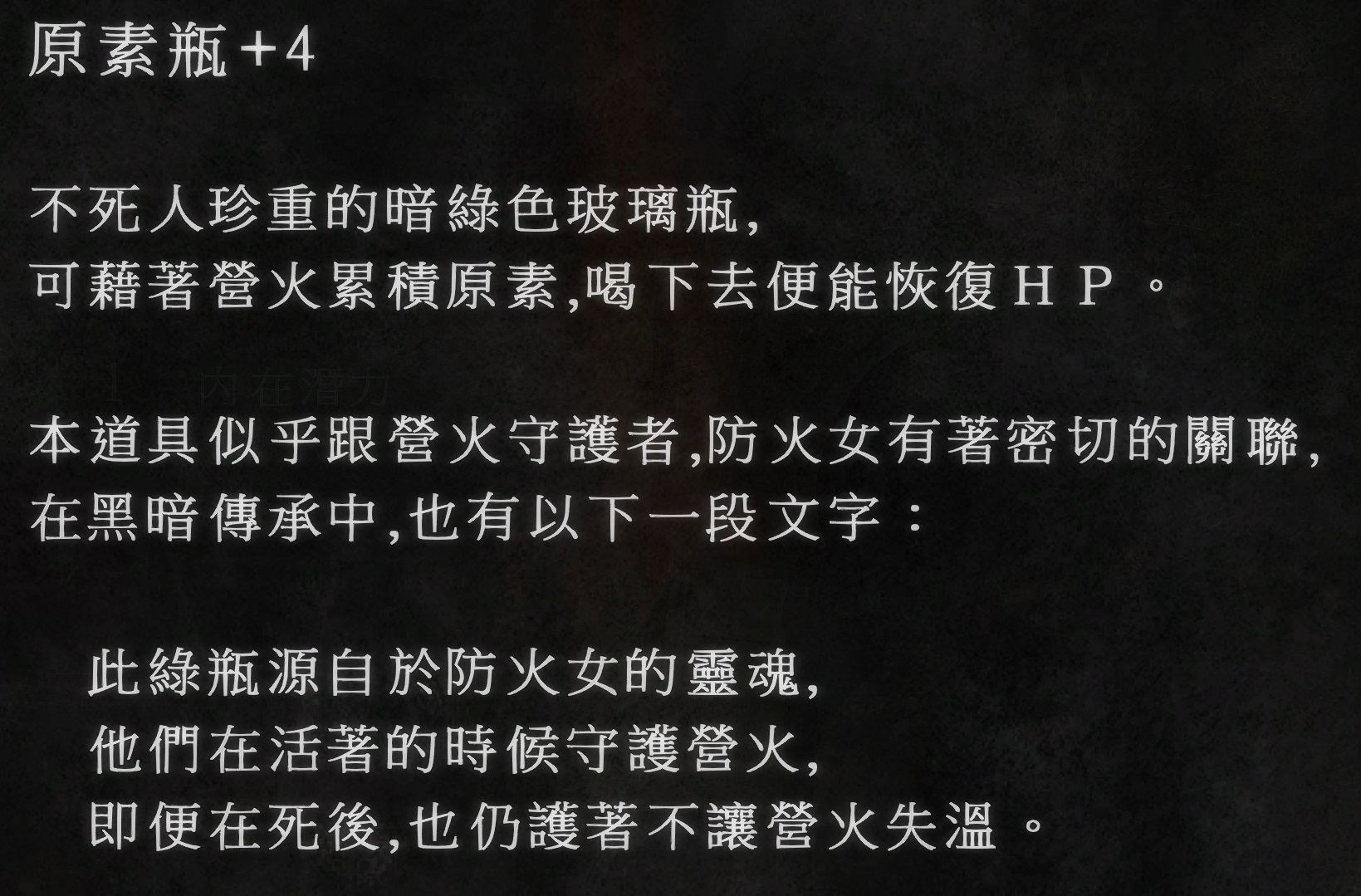
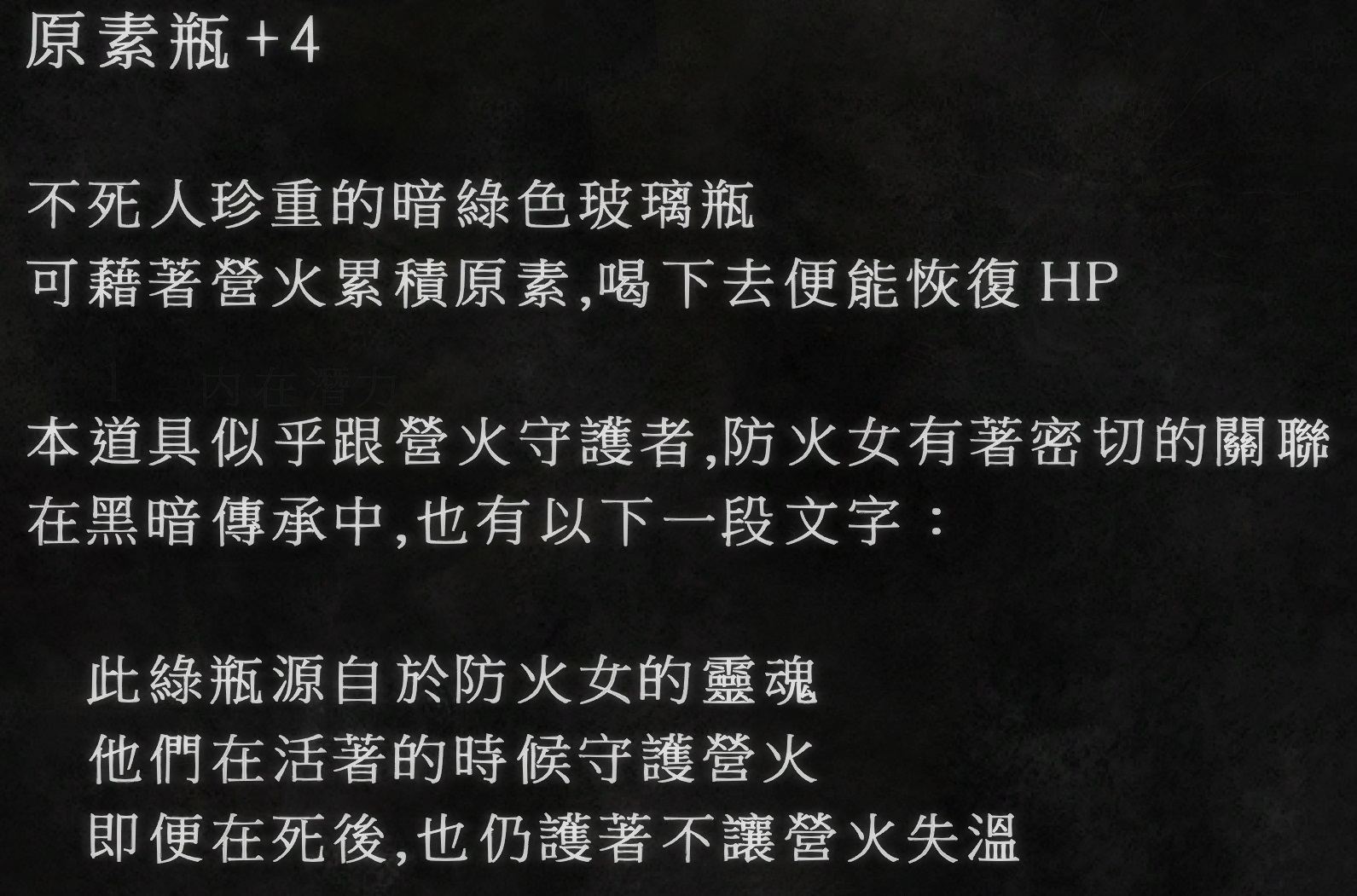
    <content type="html"><![CDATA[<img src="/2016/10/17/darksouls-revised-text/darksouls_dlc_pk.jpeg" class=""><h1 id="简介"><a href="#简介" class="headerlink" title="简介"></a>简介</h1><p>首先黑魂标点符号参差不齐显示效果比较糟心，然后又到处加多余的逗号句号，于是我就做了这个补丁解决这些问题。</p><span id="more"></span><h1 id="具体改动"><a href="#具体改动" class="headerlink" title="具体改动"></a>具体改动</h1><table><thead><tr><th><strong>改动的内容</strong></th><th><strong>改动后</strong></th></tr></thead><tbody><tr><td>省略号……</td><td>缩小为…</td></tr><tr><td>会话中的逗号句号</td><td>半角空格</td></tr><tr><td>其它文本行末的逗号句号</td><td>删除（包含另外两个版本，一个是不做处理，一个是全部文本中的逗号句号都替换成空格）</td></tr><tr><td>各种斜杠╱／/</td><td>统一用 /</td></tr><tr><td>各种加号＋+</td><td>统一用 +</td></tr><tr><td>全角ＨＰ</td><td>半角 HP</td></tr><tr><td>希芙</td><td>希夫</td></tr><tr><td>PRESS START BUTTON</td><td>按下 START 鍵</td></tr><tr><td>NEW GAME</td><td>開始遊戲</td></tr><tr><td>LOAD GAME</td><td>繼續遊戲</td></tr><tr><td>篝火传送地点底部几个地名前的空格</td><td>删除</td></tr><tr><td>出血、中毒等提示最前面的感叹号</td><td>删除</td></tr></tbody></table><h1 id="预览"><a href="#预览" class="headerlink" title="预览"></a>预览</h1><table><thead><tr><th><strong>改动前</strong></th><th><strong>改动后</strong></th></tr></thead><tbody><tr><td><img src="/2016/10/17/darksouls-revised-text/before1.png" class=""></td><td><img src="/2016/10/17/darksouls-revised-text/after1.png" class=""></td></tr><tr><td><img src="/2016/10/17/darksouls-revised-text/before2.jpeg" class=""></td><td><img src="/2016/10/17/darksouls-revised-text/after2.jpeg" class=""></td></tr><tr><td><img src="/2016/10/17/darksouls-revised-text/before3.png" class=""></td><td><img src="/2016/10/17/darksouls-revised-text/after3.png" class=""></td></tr></tbody></table><h1 id="下载"><a href="#下载" class="headerlink" title="下载"></a>下载</h1><p>包含三个版本，分别为是否删除行末逗号句号和替换全文逗号句号为空格，请根据自己的喜好使用。建议和<a href="/2016/10/17/darksouls-hd-text/">黑暗之魂繁体中文文字高清 MOD</a> 搭配，效果更佳。</p><p>链接: <a href="https://pan.baidu.com/s/1DBGeBBiJX3eh1kgVfd55Wg">https://pan.baidu.com/s/1DBGeBBiJX3eh1kgVfd55Wg</a> 提取码: cvvu</p><h1 id="使用说明"><a href="#使用说明" class="headerlink" title="使用说明"></a>使用说明</h1><ol><li>打开游戏 exe 文件所在目录，备份 dvdbnd3.bdt 和 dvdbnd3.bhd5 文件，以备出现问题还原</li><li>选择自己喜欢的修改版本覆盖源文件</li><li>打开游戏受苦</li></ol><h1 id="如何自己制作补丁"><a href="#如何自己制作补丁" class="headerlink" title="如何自己制作补丁"></a>如何自己制作补丁</h1><h2 id="工具"><a href="#工具" class="headerlink" title="工具"></a>工具</h2><ul><li><a href="https://github.com/Burton-Radons/Alexandria?utm_source=cowlevel">Alexandria</a> 用来查看黑魂的资源文件（非必须）</li><li><a href="http://wulf2k.ca/consoles/PS3/DeS/DeS-BNDBuild-2016-04-16-01.rar?utm_source=cowlevel">BND File Rebuilder</a> 用来解包打包黑魂的资源文件</li><li><a href="http://zenhax.com/viewtopic.php?f=12&t=1933&utm_source=cowlevel#p11229">darksouls2_texttool</a> 用来将包含文本内容的 fmg 文件与 txt 文件互转</li></ul><h2 id="步骤"><a href="#步骤" class="headerlink" title="步骤"></a>步骤</h2><ol><li>用 BND File Rebuilder 解包 dvdbnd3.bhd5 文件得到 dvdbnd3.bhd5.extract 目录</li><li>进入 dvdbnd3.bhd5.extract\msg\TCHINESE 目录，继续用 BND File Rebuilder 解包 item.msgbnd.dcx 和 menu.msgbnd.dcx 得到 item.msgbnd 和 menu.msgbnd</li><li>还是用 BND File Rebuilder 解包 item.msgbnd 和 menu.msgbnd 得到 item.msgbnd.extract 和 menu.msgbnd.extract 目录</li><li>运行 darksouls2_export.exe 工具，选择 dvdbnd3.bhd5.extract\msg\TCHINESE 目录得到 TCHINESE.txt 文件</li><li>修改 TCHINESE.txt 文件，注意中文得用繁体而且不能增删行数</li><li>运行 darksouls2_import.exe 先选择 TCHINESE.txt 文件，接着选择 dvdbnd3.bhd5.extract\msg\TCHINESE 用于将修改的文本打包回去</li><li>反过来来操作 1、2、3 步，使用 BND File Rebuilder 按照顺序分别选择 item.msgbnd、menu.msgbnd、item.msgbnd.dcx、menu.msgbnd.dcx、dvdbnd3.bhd5 进行打包</li><li>完成</li></ol>]]></content>
    
    
    <summary type="html">&lt;img src=&quot;/2016/10/17/darksouls-revised-text/darksouls_dlc_pk.jpeg&quot; class=&quot;&quot;&gt;
&lt;h1 id=&quot;简介&quot;&gt;&lt;a href=&quot;#简介&quot; class=&quot;headerlink&quot; title=&quot;简介&quot;&gt;&lt;/a&gt;简介&lt;/h1&gt;&lt;p&gt;首先黑魂标点符号参差不齐显示效果比较糟心，然后又到处加多余的逗号句号，于是我就做了这个补丁解决这些问题。&lt;/p&gt;</summary>


    <category term="游戏" scheme="https://www.demojameson.com/categories/%E6%B8%B8%E6%88%8F/"/>
    
    
    <category term="darksouls" scheme="https://www.demojameson.com/tags/darksouls/"/>
    
    <category term="黑暗之魂" scheme="https://www.demojameson.com/tags/%E9%BB%91%E6%9A%97%E4%B9%8B%E9%AD%82/"/>
    
    <category term="受苦" scheme="https://www.demojameson.com/tags/%E5%8F%97%E8%8B%A6/"/>
    
    <category term="传火" scheme="https://www.demojameson.com/tags/%E4%BC%A0%E7%81%AB/"/>
    
    <category term="MOD" scheme="https://www.demojameson.com/tags/MOD/"/>
    
  </entry>
  
  <entry>
    <title>黑暗之魂受死版繁体中文文字高清 MOD</title>
    <link href="https://www.demojameson.com/2016/10/17/darksouls-hd-text/"/>
    <id>https://www.demojameson.com/2016/10/17/darksouls-hd-text/</id>
    <published>2016-10-17T06:42:03.000Z</published>
    <updated>2016-10-17T06:42:03.000Z</updated>
    
    <content type="html"><![CDATA[<img src="/2016/10/17/darksouls-hd-text/darksouls_firelink_shrine.jpeg" class=""><h1 id="简介"><a href="#简介" class="headerlink" title="简介"></a>简介</h1><p>最近在 <a href="https://cowlevel.net/people/moyitula">@莫伊图拉</a>‍ 的安利下开始了魂一的受苦之旅并借助 <a href="https://github.com/PeterTh/dsfix?utm_source=cowlevel">DSfix</a> 打上了一系列的 MOD，其中有个很受欢迎的<a href="http://www.nexusmods.com/darksouls/mods/21/?&utm_source=cowlevel">界面文字与会话对白高清 MOD</a> 能够很好的提升玩家的游戏体验，不过该 MOD 对繁体中文的支持不太好，只有界面文字得到了调整并且许多文字有污点（位图字体没对准所致）。在打完小隆德四天王后我的忍耐达到了极限（你这不怎么看道具说明和对白的人有什么要忍耐的←_←），遂对位图字体进行重绘做出了此 MOD。</p><span id="more"></span><h1 id="预览"><a href="#预览" class="headerlink" title="预览"></a>预览</h1><h2 id="界面文字对比"><a href="#界面文字对比" class="headerlink" title="界面文字对比"></a>界面文字对比</h2><table><thead><tr><th></th><th><strong>改动前</strong></th><th><strong>改动后</strong></th></tr></thead><tbody><tr><td><strong>界面文字对比</strong></td><td><img src="/2016/10/17/darksouls-hd-text/interface_text_before.png" class=""></td><td><img src="/2016/10/17/darksouls-hd-text/interface_text_after.png" class=""></td></tr><tr><td><strong>会话文字对比</strong></td><td><img src="/2016/10/17/darksouls-hd-text/subtitle_before.png" class=""></td><td><img src="/2016/10/17/darksouls-hd-text/subtitle_after.png" class=""></td></tr></tbody></table><h1 id="下载"><a href="#下载" class="headerlink" title="下载"></a>下载</h1><p>包含 <a href="https://steamcommunity.com/app/211420/discussions/0/392184522702551585?utm_source=cowlevel">GitHub 新版 DSfix</a>（增加预加载纹理材质文件的功能以及修复自动备份功能）和 MOD 本体<br>链接: <a href="https://pan.baidu.com/s/1DBGeBBiJX3eh1kgVfd55Wg">https://pan.baidu.com/s/1DBGeBBiJX3eh1kgVfd55Wg</a> 提取码: cvvu</p><h1 id="使用说明"><a href="#使用说明" class="headerlink" title="使用说明"></a>使用说明</h1><ol><li><p>解压所有文件到 DARKSOULS.exe 所在的目录</p></li><li><p>打开 DSfix.ini 并将以下两个参数修改为你游戏中的分辨率</p><figure class="highlight plaintext"><table><tr><td class="code"><pre><span class="line">renderWidth  3840</span><br><span class="line">renderHeight 2160</span><br></pre></td></tr></table></figure></li><li><p> 打开游戏进入设置界面关闭抗锯齿，不然加载存档时游戏会报错</p></li><li><p>开始受苦</p></li></ol><p>根据我制作 MOD 时的瞌睡程度有可能出现错字、污点、缺字等等问题，反馈时麻烦告知是界面字体还是会话字体并且出现在何处，感谢配合。</p><h1 id="制作历程"><a href="#制作历程" class="headerlink" title="制作历程"></a>制作历程</h1><p>首先 DSfix 提供了导出纹理材质文件的功能，从中找出需要修改的位图字体文件。字体文件分成界面字体和会话字体两类，这两类字体我在重绘时分别选择了新细明体和标楷体两种与原来十分相似的字体，并且将界面字体中出现的日文异体字替换成正常的字形（如原字体中的<strong>道</strong>字走之底是两点，因为日文与繁体中文使用的是同一套字体），而会话字体我在参照原字体进行描边处理后发现在游戏中缩放后会有白色的斑点，所以最终我取消了描边。</p><p>找到字体文件后下一步就是将图片中的文本提取出来，借助<a href="http://www.onlineocr.net/?utm_source=cowlevel">在线 OCR 服务</a>或者 <a href="http://www.abbyy.cn/finereader/?utm_source=cowlevel">OCR 软件</a>还有直接从 <a href="http://unicode-table.com/cn?utm_source=cowlevel">Unicode 编码表</a>中复制等手段可以完成该工作。</p><p>最后则是用 Photoshop 将原字体图片放大 4 倍，然后把准备好的文本铺上去调整每个文字的位置使其和原图一致，大功告成！（总共三十几张图，很惭愧，就做了一点微小的工作）</p><h1 id="MOD-与插件推荐"><a href="#MOD-与插件推荐" class="headerlink" title="MOD 与插件推荐"></a>MOD 与插件推荐</h1><p>下面是我在用的一些 MOD 和插件，个人感觉可以提高游戏体验并且不会造成游戏卡顿，请根据个人喜好下载安装：</p><ul><li><a href="http://www.nexusmods.com/darksouls/mods/446/?&utm_source=cowlevel">游戏场景高清材质包</a></li><li><a href="http://www.nexusmods.com/darksouls/mods/289/?&utm_source=cowlevel">SweetFX HDR</a> 游戏画面效果增强插件，与上一个 MOD 是同一个作者建议配套使用，我比较喜欢其中的 Natural and Soft 风格效果。游戏中可按 **Scroll Lock **键开启 / 关闭效果</li><li><a href="http://www.nexusmods.com/darksouls/mods/1107/?&utm_source=cowlevel">魂三界面 MOD</a>，使用中文语言进行游戏的话需要将 40fbc4ad.dds 文件改名为 8fdc74b1.dds 不然手柄按钮高清图将不起作用</li><li><a href="http://www.nexusmods.com/darksouls/mods/1047/?&utm_source=cowlevel">联机增强插件</a> 提高连接上其他玩家的几率与个数，并且可以方便与特定玩家联机（后者我还没尝试过）</li><li><a href="http://www.nexusmods.com/darksouls/mods/585/?&utm_source=cowlevel">开始界面的 Logo 动画</a>，篝火加配乐十分融洽</li><li>取用网上的 GIF 动画制作了 <a href="http://steamcommunity.com/sharedfiles/filedetails/?id=356583468&utm_source=cowlevel">Artorias</a> 和 <a href="http://steamcommunity.com/sharedfiles/filedetails/?id=217494524&utm_source=cowlevel">Nito</a> 的 Loding 动画以及原动画去污点版（与字体 MOD 同一下载地址）</li><li>自制的<a href="/2016/10/17/darksouls-revised-text/">繁体中文文本校正补丁</a>，调整了标点符号和修复一些明显的错误</li></ul>]]></content>
    
    
    <summary type="html">&lt;img src=&quot;/2016/10/17/darksouls-hd-text/darksouls_firelink_shrine.jpeg&quot; class=&quot;&quot;&gt;
&lt;h1 id=&quot;简介&quot;&gt;&lt;a href=&quot;#简介&quot; class=&quot;headerlink&quot; title=&quot;简介&quot;&gt;&lt;/a&gt;简介&lt;/h1&gt;&lt;p&gt;最近在 &lt;a href=&quot;https://cowlevel.net/people/moyitula&quot;&gt;@莫伊图拉&lt;/a&gt;‍ 的安利下开始了魂一的受苦之旅并借助 &lt;a href=&quot;https://github.com/PeterTh/dsfix?utm_source=cowlevel&quot;&gt;DSfix&lt;/a&gt; 打上了一系列的 MOD，其中有个很受欢迎的&lt;a href=&quot;http://www.nexusmods.com/darksouls/mods/21/?&amp;utm_source=cowlevel&quot;&gt;界面文字与会话对白高清 MOD&lt;/a&gt; 能够很好的提升玩家的游戏体验，不过该 MOD 对繁体中文的支持不太好，只有界面文字得到了调整并且许多文字有污点（位图字体没对准所致）。在打完小隆德四天王后我的忍耐达到了极限（你这不怎么看道具说明和对白的人有什么要忍耐的←_←），遂对位图字体进行重绘做出了此 MOD。&lt;/p&gt;</summary>


    <category term="游戏" scheme="https://www.demojameson.com/categories/%E6%B8%B8%E6%88%8F/"/>
    
    
    <category term="darksouls" scheme="https://www.demojameson.com/tags/darksouls/"/>
    
    <category term="黑暗之魂" scheme="https://www.demojameson.com/tags/%E9%BB%91%E6%9A%97%E4%B9%8B%E9%AD%82/"/>
    
    <category term="受苦" scheme="https://www.demojameson.com/tags/%E5%8F%97%E8%8B%A6/"/>
    
    <category term="传火" scheme="https://www.demojameson.com/tags/%E4%BC%A0%E7%81%AB/"/>
    
    <category term="MOD" scheme="https://www.demojameson.com/tags/MOD/"/>
    
  </entry>
  
  <entry>
    <title>Genymotion 安装记 —— 曾经最快的 Android 模拟器</title>
    <link href="https://www.demojameson.com/2015/12/15/genymotion-bug/"/>
    <id>https://www.demojameson.com/2015/12/15/genymotion-bug/</id>
    <published>2015-12-15T09:42:03.000Z</published>
    <updated>2015-12-16T07:33:05.000Z</updated>
    
    <content type="html"><![CDATA[<img src="/2015/12/15/genymotion-bug/genymotion-cover.png" class=""><br>> Genymotion —— 曾经最快的 Android 模拟器，简单，实用，高效。>> Android Studio 2.0 之后版本自带的模拟器已经够用了，前提是你用的 Intel CPU<span id="more"></span><h3 id="下载"><a href="#下载" class="headerlink" title="下载"></a>下载</h3><p><a href="https://www.genymotion.com/">注册</a>之后才能之后才能<a href="https://www.genymotion.com/#!/download">下载</a>，根据是否集成 VirtualBox 有两种版本可供选择。</p><h3 id="安装"><a href="#安装" class="headerlink" title="安装"></a>安装</h3><ul><li>一路 Next 即可。如果是集成了 VirtualBox 的版本，安装过程中会弹出 VirtualBox 的安装界面</li><li>推荐在 IDE 里安装相应的 Genymotion 插件以便直接打开模拟器，具体安装说明请看<a href="https://www.genymotion.com/#!/download">下载页面</a></li></ul><h3 id="使用"><a href="#使用" class="headerlink" title="使用"></a>使用</h3><p>运行 Genymotion 后先登陆，然后添加下载需要使用的镜像，接着点击 Start 运行模拟器就 OK 了。OK 个大头鬼，接着我就遇到了点问题：</p><ol><li>运行后弹错误提示 balabala 的，然后我打开 VirtualBox 查看详细信息，具体错误信息没有记录下来。Google 一发后没有找到解决方案，我就将 VirtualBox 从 5.0.4 升级到 5.0.10。</li><li>可惜还是不能运行，不过错误信息变成了 <code>Unable to load R3 module</code>，从网络中找到了<a href="http://tieba.baidu.com/p/3369724797">解决方案</a>，大意是因为破解了 uxtheme.dll 文件所以出错了云云，借用工具将其还原即可</li><li>今天开机又出现刚一开始的错误了： <figure class="highlight plaintext"><table><tr><td class="code"><pre><span class="line">The virtual machine &#x27;Custom Phone - 4.1.1 - API 16 - 768x1280&#x27; has terminated unexpectedly during startup with exit code -1073741819 (0xc0000005).</span><br><span class="line"></span><br><span class="line">返回代码:    E_FAIL (0x80004005)</span><br><span class="line">组件:        MachineWrap</span><br><span class="line">界面:        IMachine &#123;f30138d4-e5ea-4b3a-8858-a059de4c93fd&#125;</span><br></pre></td></tr></table></figure> 经过搜索发现是 Mactype 的锅，也就表明一开始升级 VirtualBox 并不能解决问题，正确的姿势应该是将 VirtualBox 的相关进程从 Mactype 中排除，将以下内容添加到配置文件中： <figure class="highlight plaintext"><table><tr><td class="code"><pre><span class="line">[UnloadDll]</span><br><span class="line">VBoxSVC.exe</span><br><span class="line">VirtualBox.exe</span><br></pre></td></tr></table></figure></li></ol><h3 id="更新记录"><a href="#更新记录" class="headerlink" title="更新记录"></a>更新记录</h3><ul><li>2015 年 12 月 15 日 - 发布</li><li>2015 年 12 月 16 日 - 添加 Mactype 导致的错误描述以及解决方案</li><li>2017 年 03 月 26 日 - 不推荐 Genymotion，建议使用新版 Android Studio 自带的模拟器</li></ul>]]></content>
    
    
    <summary type="html">&lt;img src=&quot;/2015/12/15/genymotion-bug/genymotion-cover.png&quot; class=&quot;&quot;&gt;
&lt;br&gt;
&gt; Genymotion —— 曾经最快的 Android 模拟器，简单，实用，高效。
&gt;
&gt; Android Studio 2.0 之后版本自带的模拟器已经够用了，前提是你用的 Intel CPU</summary>


    <category term="编程" scheme="https://www.demojameson.com/categories/%E7%BC%96%E7%A8%8B/"/>
    
    
    <category term="安卓" scheme="https://www.demojameson.com/tags/%E5%AE%89%E5%8D%93/"/>
    
    <category term="Android" scheme="https://www.demojameson.com/tags/Android/"/>
    
    <category term="bug" scheme="https://www.demojameson.com/tags/bug/"/>
    
    <category term="genymotion" scheme="https://www.demojameson.com/tags/genymotion/"/>
    
  </entry>
  
  <entry>
    <title>曾经造过的轮子——《以撒的结合》Roll 不崩插件</title>
    <link href="https://www.demojameson.com/2015/12/04/binding-of-isaac-plugin/"/>
    <id>https://www.demojameson.com/2015/12/04/binding-of-isaac-plugin/</id>
    <published>2015-12-04T13:18:26.000Z</published>
    <updated>2019-10-17T07:41:12.943Z</updated>
    
    <content type="html"><![CDATA[<img src="/2015/12/04/binding-of-isaac-plugin/love-my-perler.jpg" class=""><p>以撒的结合 SpiderMod 版本插件，用于修复刷新道具时游戏崩溃以及道具池相关问题</p><p>SpiderMod 官网：<a href="http://spidermod.spiderland.net/">http://spidermod.spiderland.net/</a></p><span id="more"></span><h3 id="Roll-崩-Bug"><a href="#Roll-崩-Bug" class="headerlink" title="Roll 崩 Bug"></a>Roll 崩 Bug</h3><p>关于游戏会被 Roll 崩这个 Bug，首先我们来简单的了解一下以撒这个游戏中道具的刷新机制。</p><ol><li>不同的房间有不同的道具列表，所以我们能在不同的房间刷出各种类别的道具，游戏崩溃这个 Bug 出现在普通房间 / 宝物房道具列表中</li><li>在普通房间 / 宝物房生成道具或刷新道具时会从道具列表中随机抽取一个出来</li><li>验证这个道具是否曾经捡过，如果没捡过继续第 4 步，否则跳到第 5 步</li><li>把这个道具从道具列表里删除</li><li>假如道具列表剩余道具数小于等于 5 个，恢复道具列表（满满的道具，相当于刚开始游戏时的状态）</li><li>假如第 3 步的道具没捡过的话就生成或刷新出这个道具，否则跳回第 2 步<br>这个 Bug 的关键是当道具列表恢复过一次以后，我们曾经捡过的道具也在里面，那么第 3 步这些道具就会被跳过不会从道具列表里删除，而假如我们捡过的道具超过 5 个，这时就会与第 6 步组成无限循环，于是就卡死了。</li></ol><p>这样修复这个 Bug 的关键是，曾经捡过的道具必须从道具列表里删除。我们只需要在第 3 步检查到曾经捡过的道具时，将其从道具列表中删除即可。当然实际代码中有许多细节需要兼顾，这里就不赘述了。</p><h3 id="另外还修复了两个-Bug"><a href="#另外还修复了两个-Bug" class="headerlink" title="另外还修复了两个 Bug"></a>另外还修复了两个 Bug</h3><ol><li>Boss 房 / 普通隐藏房 / Boss 挑战房有可能会出现未定义道具（不吃这些房间的任何道具，用 SpiderMod 进这些房间后狂按 F6 就能看到这个 Bug 了）</li><li>商店道具列表最后一个道具永远不会出现的问题（同样用 SpiderMod 进商店狂按 F6，然后菜单 - 内置 - 道具列表中可以查看还剩一个道具在里面，如果是修女服就哭吧）</li></ol><h3 id="使用说明"><a href="#使用说明" class="headerlink" title="使用说明"></a>使用说明</h3><p>下载解压到 SpiderMod 的 Plugins 目录中，启动 SpiderMod，菜单 - 插件 - 启用，重启 SpiderMod，菜单 - 插件 - 设置，在想启用的插件前打上勾，再次重新启动 SpiderMod 即可。<br>记得同时启用 PhD Bug 修复插件，这样才能确保游戏不会像陆夫人那样崩掉。</p><h3 id="下载地址"><a href="#下载地址" class="headerlink" title="下载地址"></a>下载地址</h3><p>插件: <a href="https://github.com/DemoJameson/bindingOfIsaacPlugin/archive/master.zip">https://github.com/DemoJameson/bindingOfIsaacPlugin/archive/master.zip</a><br>本人汉化的 SpiderMod + 插件: <a href="http://pan.baidu.com/s/1qYAgiba">http://pan.baidu.com/s/1qYAgiba</a> 密码:pfgq</p>]]></content>
    
    
    <summary type="html">&lt;img src=&quot;/2015/12/04/binding-of-isaac-plugin/love-my-perler.jpg&quot; class=&quot;&quot;&gt;

&lt;p&gt;以撒的结合 SpiderMod 版本插件，用于修复刷新道具时游戏崩溃以及道具池相关问题&lt;/p&gt;
&lt;p&gt;SpiderMod 官网：&lt;a href=&quot;http://spidermod.spiderland.net/&quot;&gt;http://spidermod.spiderland.net/&lt;/a&gt;&lt;/p&gt;</summary>


    <category term="游戏" scheme="https://www.demojameson.com/categories/%E6%B8%B8%E6%88%8F/"/>
    
    
    <category term="以撒的结合" scheme="https://www.demojameson.com/tags/%E4%BB%A5%E6%92%92%E7%9A%84%E7%BB%93%E5%90%88/"/>
    
    <category term="游戏" scheme="https://www.demojameson.com/tags/%E6%B8%B8%E6%88%8F/"/>
    
    <category term="插件" scheme="https://www.demojameson.com/tags/%E6%8F%92%E4%BB%B6/"/>
    
    <category term="轮子" scheme="https://www.demojameson.com/tags/%E8%BD%AE%E5%AD%90/"/>
    
    <category term="isaac" scheme="https://www.demojameson.com/tags/isaac/"/>
    
  </entry>
  
  <entry>
    <title>随机莫名无法输入中文的问题 “IME 已停用” 治标法</title>
    <link href="https://www.demojameson.com/2015/12/02/windows-ime-stop/"/>
    <id>https://www.demojameson.com/2015/12/02/windows-ime-stop/</id>
    <published>2015-12-02T12:40:34.000Z</published>
    <updated>2015-12-03T09:07:51.000Z</updated>
    
    <content type="html"><![CDATA[<img src="/2015/12/02/windows-ime-stop/windows-10-logo.gif" class=""><p>升级到 Win 10 后才遇到的问题，上网一搜发现 Win 8 时已经有同病相怜的人了，可是直到如今依然没法解决 -_-</p><span id="more"></span><h3 id="问题描述"><a href="#问题描述" class="headerlink" title="问题描述"></a>问题描述</h3><p>时不时，通常是倒杯水坐下后就发现打不了中文了。屏幕右下角还十分好意的打着一个叉叉提醒人“IME 已停用”。那我回来了你是不是应该正常工作了呢，Windows 大爷，可是无论怎么捣鼓他就不是不给你打中文。</p><h3 id="治标之法"><a href="#治标之法" class="headerlink" title="治标之法"></a>治标之法</h3><p>所以说网络搜索引擎是多么伟大的发明，上网搜索后还是有那么两招能够缓解一下这个问题产生的蛋疼：</p><ol><li>Win + X 打开 “计算机管理”</li><li>来跟着我点开系统工具 - 任务计划程序 - 任务计划程序库 - Microsoft - Windows - TextServiceFramework</li><li>看到右边那 MsCtfMonitor 的字样没，对就是他，右键狠狠的点，然后运行</li><li>Windows 大爷终于又肯让你输入中文了</li></ol><p>补充：如果第 2 步你就已经进行不下去了，可能是 Windows 大爷发功把 Task Scheduler 关了，请在 “计算机管理” 界面找到 “Task Scheduler” 这个服务并运行之再继续第 2 步</p>]]></content>
    
    
    <summary type="html">&lt;img src=&quot;/2015/12/02/windows-ime-stop/windows-10-logo.gif&quot; class=&quot;&quot;&gt;

&lt;p&gt;升级到 Win 10 后才遇到的问题，上网一搜发现 Win 8 时已经有同病相怜的人了，可是直到如今依然没法解决 -_-&lt;/p&gt;</summary>


    <category term="Windows" scheme="https://www.demojameson.com/categories/Windows/"/>
    
    
    <category term="Windows" scheme="https://www.demojameson.com/tags/Windows/"/>
    
    <category term="系统" scheme="https://www.demojameson.com/tags/%E7%B3%BB%E7%BB%9F/"/>
    
  </entry>
  
  <entry>
    <title>搭建使用 Hexo 的些许经验</title>
    <link href="https://www.demojameson.com/2015/11/26/about-hexo/"/>
    <id>https://www.demojameson.com/2015/11/26/about-hexo/</id>
    <published>2015-11-25T20:43:47.000Z</published>
    <updated>2015-11-29T05:55:52.000Z</updated>
    
    <content type="html"><![CDATA[<img src="/2015/11/26/about-hexo/hexo-logo.png" class=""></br><p>Hexo 的搭建的确挺方便的，然而使用过程中却是遇到了不少问题，这里就权当记录了。</p><span id="more"></span><h3 id="解决-GitHub-Pages-的-302-转向问题"><a href="#解决-GitHub-Pages-的-302-转向问题" class="headerlink" title="解决 GitHub Pages 的 302 转向问题"></a>解决 GitHub Pages 的 302 转向问题</h3><p>之前使用的是根域名 <code>demojameson.com</code>，设置 Swiftype 后发现一直无法抓取到内容。添加 sitemap.xml 添加 robot.txt 等办法通通无效后，<a href="http://theo.im/blog/2014/05/14/resolve-302-redirection-on-github-pages/">几经搜索才发现是 302 问题</a>。所以还是老老实实按照 <a href="https://help.github.com/articles/about-custom-domains-for-github-pages-sites/#subdomains">GitHub 的建议使用二级域名了</a>。</p><h3 id="文章中的-title-注意转义"><a href="#文章中的-title-注意转义" class="headerlink" title="文章中的 title 注意转义"></a>文章中的 title 注意转义</h3><p>写 <a href="/2015/11/08/why-kotlin/">[译] 为什么 Kotlin 是我下一门要使用的语言</a>这篇文章时发现 title 添加 [] 符号后就无法 Generate 了。因为开头这部分被称为 <a href="https://hexo.io/zh-cn/docs/front-matter.html">Front-matter</a>，使用 YAML 格式记录文章的数据，某些符号需要转义时使用单引号框住即可正常工作。</p><h3 id="同时兼顾本地编辑时图片的预览以及网页的正常显示"><a href="#同时兼顾本地编辑时图片的预览以及网页的正常显示" class="headerlink" title="同时兼顾本地编辑时图片的预览以及网页的正常显示"></a>同时兼顾本地编辑时图片的预览以及网页的正常显示</h3><p>Markdown 中引用网络上绝对地址的图片即可，可<a href="http://yotuku.cn/">使用七牛云存储当图床</a>。</p><p>不过最终我还是选择了直接将文章中的图片上传到 GitHub 中（本地编辑无法预览图片），如果文章中图片使用的是相对路径需要<a href="https://hexo.io/docs/asset-folders.html">进行一些变动</a></p><h3 id="百度无法抓取-GitHub-Pages-内容的问题"><a href="#百度无法抓取-GitHub-Pages-内容的问题" class="headerlink" title="百度无法抓取 GitHub Pages 内容的问题"></a>百度无法抓取 GitHub Pages 内容的问题</h3><p>GitHub 禁止了百度的爬虫，<a href="http://jerryzou.com/posts/feasibility-of-allowing-baiduSpider-for-Github-Pages/">解决方法挺多</a>，一箭双雕的方案是同时部署到 GitHub 以及 GitCafe，<a href="http://godera.org/2015/03/16/Mac%E4%B8%8B%E7%A8%8B%E5%BA%8F%E5%91%98%E5%8D%9A%E5%AE%A2%E4%B9%8BHexo-GitHub-Pages-GitCafe-Pages-DNSPod/">通过 DNSPod 将国内线路解析到 GitCafe</a>。然并卵，百度可以抓取到 sitemap，抓取诊断也没有问题，但是索引量依旧是零，哈哈哈哈~</p><figure class="highlight plaintext"><table><tr><td class="code"><pre><span class="line"># _config.yml 文件同时部署到 GitHub 与 GitCafe 的配置</span><br><span class="line">deploy:</span><br><span class="line">  type: git</span><br><span class="line">  message: [message]</span><br><span class="line">  repo:</span><br><span class="line">    github: &lt;repository url&gt;,[branch]</span><br><span class="line">    gitcafe: &lt;repository url&gt;,[branch]</span><br></pre></td></tr></table></figure><h3 id="从根域名自动跳转到-www-子域名"><a href="#从根域名自动跳转到-www-子域名" class="headerlink" title="从根域名自动跳转到 www 子域名"></a>从根域名自动跳转到 www 子域名</h3><p>GitHub 会帮你自动跳转，但是 GitCafe 需要自己到域名解析服务商设置，可用 DNSPod 的显性转发功能（域名托管 30 天后才可使用该功能）</p><h3 id="插件推荐"><a href="#插件推荐" class="headerlink" title="插件推荐"></a>插件推荐</h3><ul><li><a href="https://github.com/hexojs/hexo-browsersync">hexo-browsersync</a> 本地调试时修改文章后可在浏览器马上看到效果</li><li><a href="https://github.com/hexojs/hexo-deployer-git">hexo-deployer-git</a> 配置好后可以很方便的更新文章到 GitHub Pages</li><li><a href="https://github.com/hexojs/hexo-generator-sitemap">hexo-generator-sitemap</a> 在网站根目录生成 sitemap.xml 方便搜索引擎抓取</li></ul><h3 id="更新历史"><a href="#更新历史" class="headerlink" title="更新历史"></a>更新历史</h3><ul><li>2015 年 11 月 26 日 - 初稿</li><li>2015 年 11 月 28 日 - 添加百度无法抓取 GitHub Pages 内容的问题、从根域名自动跳转到 www 子域名</li><li>2015 年 11 月 29 日 - 百度索引量依旧是零</li></ul>]]></content>
    
    
    <summary type="html">&lt;img src=&quot;/2015/11/26/about-hexo/hexo-logo.png&quot; class=&quot;&quot;&gt;

&lt;/br&gt;

&lt;p&gt;Hexo 的搭建的确挺方便的，然而使用过程中却是遇到了不少问题，这里就权当记录了。&lt;/p&gt;</summary>


    <category term="博客" scheme="https://www.demojameson.com/categories/%E5%8D%9A%E5%AE%A2/"/>
    
    
    <category term="Blog" scheme="https://www.demojameson.com/tags/Blog/"/>
    
    <category term="Hexo" scheme="https://www.demojameson.com/tags/Hexo/"/>
    
  </entry>
  
  <entry>
    <title>[译] 为什么 Kotlin 是我下一门要使用的语言</title>
    <link href="https://www.demojameson.com/2015/11/08/why-kotlin/"/>
    <id>https://www.demojameson.com/2015/11/08/why-kotlin/</id>
    <published>2015-11-08T12:49:11.000Z</published>
    <updated>2015-12-11T03:02:06.000Z</updated>
    
    <content type="html"><![CDATA[<img src="/2015/11/08/why-kotlin/index-page-header-bg.jpg" class="" title="坐落于俄罗斯岛屿 —— Kotlin 上的灯塔"><table><thead><tr><th>作者</th><th>原文</th></tr></thead><tbody><tr><td><a href="https://medium.com/@octskyward">Mike Hearn</a></td><td><a href="https://medium.com/@octskyward/why-kotlin-is-my-next-programming-language-c25c001e26e3?source=latest---">Why Kotlin is my next programming language</a></td></tr></tbody></table><p><a href="http://kotlinlang.org/">Kotlin</a> 是一门新的编程语言，它来自 <a href="http://jetbrains.com/">JetBrains</a> —— 世界上最伟大 IDE 的开发商。在做了许多研究后，我决定将 Kotlin 作为我未来 5 到 10 年的主力编程开发语言。</p><p>我十分喜爱 Kotlin，它将会是一个很成功的项目。人们看到我在开源项目中使用了该语言后让我介绍一下它，所以在本文中我将说明为什么 Kotlin 是优秀的，讨论一些使用中可能会遇到的问题，</p><p><em>注意：Kotlin 目前处于 beta 阶段，有望于 2015 年底发布 1.0 正式版并且提供稳定的标准库。</em></p><span id="more"></span><h3 id="为什么说-Kotlin-是优秀的"><a href="#为什么说-Kotlin-是优秀的" class="headerlink" title="为什么说 Kotlin 是优秀的"></a>为什么说 Kotlin 是优秀的</h3><p>本文不会像一般介绍语言的文章那样，一开头就罗列出语言那些酷炫的特性，我们稍后再来探讨这些内容。</p><p>首先我将介绍一些其它的信息，因为 <a href="http://sns.cs.princeton.edu/docs/asr-oopsla13.pdf">2013 年一项研究</a>显示，当开发者评估一种编程语言时生态系统要比语言特性更重要。这符合我个人的经验，下面就让我开始介绍吧：</p><p><strong>Kotlin 被编译成 JVM 字节码或者 JavaScript 代码</strong>。Java 开发者将会是对它最感兴趣的人，不过对于使用垃圾收集运行时语言的开发者而言它也具有一定的吸引力，比如 Scala、Go、Python、Ruby 和 JavaScript 等语言。</p><p><strong>Kotlin 来自业界</strong>，而不是学术界。它解决了开发者现今面临的实际问题。例如它的类型系统可以帮助你避免空指针异常。</p><p><strong>切换到 Kotlin 无需成本！</strong> 它是开源的但这不是重点，重点是它提供了一个高质量的一键从 Java 转换到 Kotlin 的工具，并且十分关注 Java 二进制文件的兼容性。你可以将现有 Java 项目的一次性转换成 Kotlin 项目，而该项目仍将可以正常编译，即使这是一个包含上百万行代码的复杂程序。</p><p>显然你可以从上文得知，<strong>Kotlin 程序能够使用所有现存的 Java 框架和库</strong>，甚至那些依赖注解处理的高级框架。它们之间的交互是无缝的，不需要包装或者适配层。Kotlin 可以整合 Maven，Gradle 以及其它构建系统。</p><p>它十分平易近人，语法精炼直观，仅仅是阅读语言参考文档<strong>几个小时就能学会使用</strong>。Kotlin 看起来十分像 Scala 但是更加简洁并且兼顾了可读性。</p><p><strong>它不遵循特定的编程哲学</strong>，例如极度的函数式编程或者面向对象编程风格。</p><p>它<strong>不会增加运行时的开销</strong>。Kotlin 的标准库十分小巧紧凑：专注于扩展 Java 标准库，编译阶段的大量内联操作意味像 map/filter/reduce 等管道结构函数将被编译成类似于命令式语言的代码。</p><p><a href="https://github.com/JetBrains/anko">Anko</a> 与 <a href="http://kovenant.komponents.nl/android/features/">Kovenant</a> 等框架的出现意味着<strong>在 Android 开发者中 Kotlin 开始变得流行起来</strong>。如果你正在从事 Android 相关的工作，相信你很快就会获得好的工作。你可以阅读这份 <a href="https://docs.google.com/document/d/1ReS3ep-hjxWA8kZi0YqDbEhCqTt29hG8P44aA9W0DM8/edit?hl=en&forcehl=1">Square 公司开发者 JakeWharton 的报告</a>，了解用 Kotlin 进行 Android 开发的体验。</p><p>Kotlin 允许你继续使用你的工作效率提升工具。<strong>IntelliJ 的 IDE 对 Kotlin 的支持十分完善</strong>：你可以对代码进行重构、搜索、导航以及使用自动完成，而且 IDE 充分支持调试、单元测试、性能分析等等功能。</p><p>除了 Android，我认为 <strong>Kotlin 还非常适用于企业中 Java 的应用场景</strong> 。如果你的工作是整天埋头于大公司的代码库中，那么当 Kotlin 1.0 版本正式发布时你应该尽快去了解一下：</p><ul><li>   <strong>由知名公司为它提供强大的商业支持</strong>。 JetBrains 这家公司 有一个高度称职的大团队致力于该项目，有稳定的商业模式甚至在自己的部分旗舰产品中使用 Kotlin，这表明短期内 Kotlin 不会被放弃。</li><li>   <strong>使用 Kotlin 风险较低</strong>：可以由一两个感兴趣的团队成员在项目中小范围的试验 Kotlin，这并不会扰乱你的项目，因为 Kotlin 的类对外提供的 Java API 看起来就与普通的 Java 代码一样。</li><li>   因为 Kotlin 十分注重语法的可读性，<strong>代码审查不会成为问题</strong>，对 Kotlin 不熟悉的团队成员仍然能够完成该工作。</li><li>   <strong>Kotlin 基于 Java 6</strong>，所以假如你难以在项目中升级使用新版本的 JVM，你可以使用 Kotlin。</li></ul><p>今年早些时候我向 Swiss Re 这家瑞士再保险公司的团队（他们使用 Java 和 .NET）展示了 Kotlin。首先我定义了一个简单的 Java 类包含一些字段以及 toString、equals、hashCode 等方法，大概有 50 行代码。然后我将它转换成 Kotlin 代码（大部分是自动完成的），结果仅剩 1 行代码，接着我还演示了其它节省时间的特性。他们看过后对 Kotlin 充满了热情并且认为 Kotlin 是它们项目中 C# 语言的一个潜在竞争对手。</p><p>我认为 Kotlin 正中企业 Java 开发者的红心，所以尽管 Kotlin 是免费的，JetBrains 还是能够通过它增加商业版本 IDE 的销售来赚大钱。这将激励他们根据用户的意愿持续改进它。</p><p>与此相比，对于那些由不相关产品资助的语言开发者来说，当用户需求与之前的设计理念冲突时，他们很少会因此作出调整。</p><hr><h3 id="特性"><a href="#特性" class="headerlink" title="特性"></a>特性</h3><p>Kotlin 作为一门新的编程语言能够脱颖而出，是因为它关注生态系统：JetBrains 懂得生产力的高低更多的取决于生态系统而不是便捷的语法。</p><p>尽快如此，Kotlin 还是有许多有用的特性能让你编码的过程变得愉快：</p><ul><li>   我们已经提过 <a href="http://kotlinlang.org/docs/reference/null-safety.html"><strong>null 安全</strong></a>（可选），它能够让编译器系统的标记潜在的空指针引用。与一些语言不同的是它不涉及 option 类，因此是零开销的，并且还有其它语言特性确保它不会造成不便。</li><li>   <strong>精炼的语法</strong>：无处不在的类型推断、简单的函数只需要一行、简单的结构以及 JavaBeans 也只需要一行就能声明、<a href="http://kotlinlang.org/docs/reference/properties.html"><strong>真正的属性</strong></a>——可以在背后自动生成 getFoo/setFoo 方法用于与 Java 进行交互、函数可以独立存在于类之外。</li><li>   <strong>异常均为非检查型</strong>。（译者注：感兴趣的可以阅读一下 <a href="https://www.ibm.com/developerworks/cn/java/j-jtp05254/">Java 理论与实践: 关于异常的争论</a>）</li><li>   使用 <a href="http://kotlinlang.org/docs/reference/data-classes.html">data class</a> 关键字创建数据类会<strong>自动生成通用方法</strong>，例如 equals、hashCode、toString 以及 copy 和 componentN（<a href="http://kotlinlang.org/docs/reference/multi-declarations.html">同时声明多个变量时会调用该方法</a>）。这将帮助你在不使用构建器的情况下便捷的获得不变类（immutable classes）。</li><li>   但如果你需要构造复杂的结构体，借助<a href="http://kotlinlang.org/docs/reference/type-safe-builders.html">类型安全的构建器</a>这个特性可以简洁的实现。如果你使用 Google Protocol Buffers 来存储结构化数据， 通过 <a href="http://levelmoney.github.io/kbuilders/">KBuilders</a> 这个库也能很轻易做到。</li><li>   <strong>支持函数式编程</strong>以及<a href="http://kotlinlang.org/docs/reference/lambdas.html">零开销的 lambda 表达式</a>，能够在 Java 的集合中做 Map、Filter、Folder 等处理。Kotlin 的类型系统能够自动识别可变或者不可变的集合。</li><li>   <a href="http://kotlinlang.org/docs/reference/extensions.html"><strong>扩展函数</strong></a>特性能够让你在不改动源码的情况下为类添加方法。乍眼一看以为是为了避免写出像 FooUtils 这种风格工具类的语法糖，不过随着使用的加深，你会认识到它不仅能帮你更加容易的通过自动完成使用方法，还能协助你集成现有的 Java API 以及借助其它 Kotlin 特性构建功能强大的扩展。</li><li>   支持<a href="http://kotlinlang.org/docs/reference/operator-overloading.html"><strong>运算符重载</strong></a>，但是不会像 Scala 或者 Perl 那样出现难以理解的代码。运算符被映射成相应名字的方法，通过重写这些方法改变运算符的行为（包括函数调用），但是不能定义新的运算符。这使得程序能够兼顾功能与可读性。</li><li>   Kotlin 没有宏或者其它的方式来重定义语言，但是通过这些精心设计的特性能够使第三方库自由的对它进行扩展，官方对集合类进行的扩展也只是小试牛刀而已，请看以下例子。</li><li>   想使用 <strong>fibers、actors 和 Go 风格的 channels</strong>？一个名为 <a href="http://blog.paralleluniverse.co/2015/06/04/quasar-kotlin/">Quasar</a> 的库已经为你实现了。</li><li>   <a href="http://kotlinlang.org/docs/reference/kotlin-doc.html"><strong>使用 Markdown 替代 HTML</strong></a> 来编写 API 文档，这样编写 JavaDocs 可比以前舒适多了。（译者注：JetBrains 提供了相应的文档生成器 <a href="http://github.com/kotlin/dokka">Dokka</a>）</li><li>   更好用的<a href="http://kotlinlang.org/docs/reference/generics.html"><strong>泛型</strong></a>。如果你没有完全掌握泛型参数中 super 以及 extends 的含义，别担心，这不是你的错。Java 的泛型的确令人费解，Kotlin 解决了这个问题。</li><li>   <a href="http://kotlinlang.org/docs/reference/delegation.html"><strong>委托</strong></a>是一个大家都知道的设计模式，Kotlin 原生支持它。</li><li>   <a href="http://kotlinlang.org/docs/reference/equality.html"><strong>== 运算符</strong></a> 的行为符合预期（译者注：简单来说 a == b 相当于 a.equals(b)；新增了 === 运算符，用来判断运算符两边是否指向同一个对象）</li><li>   想快速便捷的进行<a href="http://kovenant.komponents.nl/"><strong>异步编程</strong></a>吗？当然！</li><li>   <strong><a href="https://kotlinlang.org/docs/reference/basic-types.html#string-templates">字符串插值</a></strong> “可以使用这样的写法在字符创中直接引用变量{this.example}”</li><li>   函数中的参数可以指定默认值、使用可变长度以及通过参数名传参。</li><li>   还有许多的调整与优化。假如 Java 中有某些让你觉得困扰的问题，我相信 Kotlin 一定已经把它处理好了。</li></ul><hr><h3 id="现在就来试用一下！"><a href="#现在就来试用一下！" class="headerlink" title="现在就来试用一下！"></a>现在就来试用一下！</h3><p>跟很多现代编程语言一样，Kotlin 可以通过网页浏览器来进行体验。不过跟其他语言不一样的是，Kotlin 的实验网站提供了一个成熟的 IDE，包括响应很快的自动完成，实时的后台编译，甚至还有在线的静态分析！</p><h4 id="在线试用一下吧"><a href="#在线试用一下吧" class="headerlink" title="在线试用一下吧"></a><a href="http://try.kotlinlang.org/#"><strong>在线试用一下吧</strong></a></h4><p>好了，让我们继续接下来的内容</p><hr><h3 id="目前存在哪些问题？"><a href="#目前存在哪些问题？" class="headerlink" title="目前存在哪些问题？"></a>目前存在哪些问题？</h3><p>生活中没有什么是完美的，包括 Kotlin。以下是我尝试这门语言时遇到的一些问题。</p><p>最大的问题是不够成熟，因为 Kotlin 目前还处于 Beta 阶段，这意味着：</p><ul><li>   <a href="http://blog.jetbrains.com/kotlin/2015/06/kotlin-evolves-how-to-keep-your-code-up/">每更新一个版本，语法、ABI 以及标准库就变一次</a>。好消息是这些变化通常比较微小，可以借助 IntelliJ IDE 来自动升级你的代码，所以这个过程并不会太麻烦。</li><li>   Java-to-Kotlin 的转换工具（J2K）还没有完成。它偶尔会大规模的破坏和默默地擦除 Java 8 中的 Lambdas（<em>修改：2015 年 10 月：M13 版本的转换工具已经可以正确地处理 Java 8 的特性了</em>）。由它转换而成的代码并不总是最好的写法，但是 JetBrains 为这个工具付出了大量努力，它已经是我用过的语言转换工具中最好的了。所以我并不太担心这个问题，这个转换器正在迅速的改进中，变得越来越成熟。</li><li>   你<strong>会</strong>遇到编译器错误。尽管我的程序并不大，但还是会发生无法编译的情况，甚至错误的编译结果。诊断这些问题并不难，但终归还是影响了开发的体验。</li><li>   你<strong>会</strong>遇到 IDE 内部错误。当这个错误发生时，IntelliJ IDE 会弹出一个悬浮窗口，附带向 JetBrains 报告的选项。大部分错误无需理会，不过依然会使人厌烦。</li><li>   偶尔会出现无法加载提示文档的错误（<em>修改：M14 版本发布后，这个问题已被修复</em>）</li></ul><p>目前 JetBrains 正致力于完善发布 1.0 版本而不是添加新的功能，期待这些问题能够得到修复。</p><p>第二个我遇到的比较大的问题是，有时与 Java 的交互会受到局限。</p><p>一个典型的 Bug 是 Java 的类型系统无法防止你改变 Map 中 Key 的类型。按理来说，这样操作应该导致编译器报错，例如使用类型错误的 Key 删除元素。有些 JDK 中的集合使用了泛型，它们某些重要方法的泛型参数是 Obejct，所以编译器不会提示。当在 IntelliJ IDE 中编写 Java 代码时会有静态分析的警告，但是目前 Kotlin 环境还没有这个功能。因为 Kotlin 使用的是 Java 的集合框架没有自己实现，所以这导致了一些类型安全方面的问题，我已经遇到好几次了。<br>（<em>修改：1.0 Beta 版本中这个问题已经解决了，Java 中集合框架的类型安全缺陷在 Kotlin 已经不复存在。哟呵！</em>）</p><p>另一个例子是，当调用或使用 Java 代码时 Kotlin 的 Null 安全特性无法发挥作用（可以借助注解弥补）。作为 Kotlin 的初学者，刚开始你可能会写许多调用 Java 库的代码，但是因为以上的问题它们并没有你想象中那么好用。这种情况的改善只能等待 Kotlin 使用人数的增长。<a href="http://blog.jetbrains.com/kotlin/2015/04/upcoming-change-more-null-safety-for-java/">JetBrains 一直在尝试使 Null 安全特性能体现在 Java 交互中</a>，这种想法是好的，但有时考虑并太周全。（<em>修改: 从 M13 版本开始，在 Java 代码中将自动以 @NotNull @Nullable 等注解实现 Kotlin 的 Null 安全特性</em>）</p><p>虽然有以上的问题存在，但同时也使得我们能更流畅的使用 Java API，我觉得这种权衡是值得的，只是在开发中要注意。</p><p>其它需要考虑的问题:</p><ul><li>   Kotlin 的社区还比较小。虽然目前没有多少 Kotlin 的库可以使用，但是凭借优秀的 Java 交互能力，Kotlin 可以使用现有成熟的 Java 库。</li><li>   如果你喜欢看书来学习，那么你需要等到今年晚些时候才能看到 Kotlin 开发者写的书（译者注：<a href="https://manning.com/books/kotlin-in-action">Kotlin in Action</a>）</li><li>   纯粹的函数编程风格开发者可能会觉得类型系统中缺乏一些 Scala 或 Haskell 拥有的高级功能。如果你对类型系统一些功能比较看重，那么 Kotlin 可能不适合你。</li><li>   Kotlin 还能编译成 Javascript 代码，但是比较少用，所以可能会遇到更多的问题，这是我从论坛中得到的印象。（<em>修改: 目前 Kotlin 的开发重心在于完成 1.0 版本并使其稳定运行在 JVM 中，Javascript 方面的问题将会在 1.0 发布后着手解决</em>）</li><li>   没有标准的编程风格指南，目前 Kotlin 提供了多种语法可供选择。不同人写出来的 Kotlin 代码很可能完全不一样。这与 Go 严格的风格形成了鲜明的对比。（<em>修改: Kotlin 1.0 版本开始，一些灵活的语法已经被移除了，例如现在重载运算符以及定义中缀函数时必须分别使用 operator 和  infix 关键字进行标记</em>）</li><li>   Kotlin 的编译速度稍稍慢于 Java，以及 IntelliJ IDE 的智能提示反应有点缓慢，不算严重而且比 Scala 快多了。（<em>修改：Kotlin 1.0 开始编译速度有了明显提升</em>）</li><li>   Kotlin 有一个 Eclipse 插件，但是很明显没有 IntelliJ 的好用。</li><li>   Kotlin 在某些方面比 Java 要严格。它不会自动将 Int 转换为 Long 类型，需要开发者显示的转换。这是因为 Kotlin 关注正确性和试图解决《Java Puzzlers》一书中提出的问题。JetBrains 声称他们已经搞定一半了。</li><li>   Kotlin 基于 Java 6，因此会受到它的局限。Kotlin 与 C# 在很多领域都很相似甚至比 C# 做得更好，但是它缺少一些功能，例如 Java 平台尚未支持的值类型。</li></ul><hr><h3 id="为什么应该开始考虑使用-JVM"><a href="#为什么应该开始考虑使用-JVM" class="headerlink" title="为什么应该开始考虑使用 JVM"></a>为什么应该开始考虑使用 JVM</h3><p>最近一段时间我遇到了很多使用动态脚本语言（JavaScript 或者 Go —— 译者注：Go 应该是静态编译型语言）的创业公司。<br>我在 Bitcoin Space 工作的时候，使用动态语言是非常痛苦的事情。在这些语言里没有安全性的类型，这已经导致了<a href="https://medium.com/@octskyward/type-safety-and-rngs-40e3ec71ab3a">巨大的货币损失</a>。Go 比较少出错，但是在基础层面上给人的体验依然很差，比如说缺少好的调试工具，快速 GC 机制，稳健的管理器以及可靠的分析工具。<br>过去 15 年或者更长时间里，Java 变得越来越健壮，越来越冗长，甚至有过度设计的迹象，这些变化很大程度上源于它的声誉。企业级 Java 类的名字 <a href="http://docs.spring.io/autorepo/docs/spring/3.2.3.RELEASE/javadoc-api/org/springframework/web/servlet/mvc/method/annotation/PathVariableMapMethodArgumentResolver.html">PathVariableMapMethodArgumentResolver</a> 就是例证。在很长一段时间里我没有考虑 JVM，我确信这种环境并不适合我。</p><p>最终我因为 Android 被迫回到 Java，发现 Java 的开发环境已经改变了。虽然 XML 仍然不合时宜的频繁出现在各种场合，但是一些基础功能十分完善，令人印象深刻。 IntelliJ 是比 Eclipse 更快并且更智能的 IDE。Maven 一出现就得到了迅速的发展，拥有许多原本我想要其它构建/依赖系统增加的功能。较新的 Web 框架像 Ninja 和 Play 从类似 Ruby on Rails 的框架中学到了轻量简洁。有大量的库可供使用。硬件性能变得更高以及 JVM 变得更有效率，等等转变。</p><p>没有真正改变的是语言本身，Java 代码写起来依然是令人不快的冗长。</p><p>现在有了 Kotlin，完全无需承受离开 Java 现有的生态系统的疼苦。你可以编写更富有表现力的代码，但是却比脚本语言更简洁，同时拥有更好的性能和更少的错误。</p><p>如果你喜欢 JavaScript，可以尝试 Kotlin 的 JS 后端，或者在 <a href="http://winterbe.com/posts/2014/04/05/java8-nashorn-tutorial/">Nashorn JS</a> 引擎里运行你现有的代码。</p><p>最后，如果你喜欢 Go 语言是因为它可以编译独立运行的程序，那么试试 javapackager 工具。Kotlin 在本地为每个平台创建了捆绑包，这意味着在 linux 上不需要 JRE 的依赖就可以独立自主的获取 DEBs（linux 的安装包）或者压缩包。当然，它拆包之后不是单个文件而是单个目录，从部署的角度来看并不难操作。</p><p>简而言之：如果你之前因为看 Java 不顺眼而忽略了 JVM 的生态系统，那么你应该借着 Kotlin 这门新语言进入这个世界瞧瞧。</p><h3 id="译文更新历史"><a href="#译文更新历史" class="headerlink" title="译文更新历史"></a>译文更新历史</h3><ul><li>2015 年 11 月 08 日 - 初稿</li><li>2015 年 12 月 11 日 - 将段落 “<a href="#%E7%9B%AE%E5%89%8D%E5%AD%98%E5%9C%A8%E5%93%AA%E4%BA%9B%E9%97%AE%E9%A2%98%EF%BC%9F">目前存在哪些问题</a>” 末尾的 value types 翻译改为“值类型”</li></ul>]]></content>
    
    
    <summary type="html">&lt;img src=&quot;/2015/11/08/why-kotlin/index-page-header-bg.jpg&quot; class=&quot;&quot; title=&quot;坐落于俄罗斯岛屿 —— Kotlin 上的灯塔&quot;&gt;

&lt;table&gt;
&lt;thead&gt;
&lt;tr&gt;
&lt;th&gt;作者&lt;/th&gt;
&lt;th&gt;原文&lt;/th&gt;
&lt;/tr&gt;
&lt;/thead&gt;
&lt;tbody&gt;&lt;tr&gt;
&lt;td&gt;&lt;a href=&quot;https://medium.com/@octskyward&quot;&gt;Mike Hearn&lt;/a&gt;&lt;/td&gt;
&lt;td&gt;&lt;a href=&quot;https://medium.com/@octskyward/why-kotlin-is-my-next-programming-language-c25c001e26e3?source=latest---&quot;&gt;Why Kotlin is my next programming language&lt;/a&gt;&lt;/td&gt;
&lt;/tr&gt;
&lt;/tbody&gt;&lt;/table&gt;
&lt;p&gt;&lt;a href=&quot;http://kotlinlang.org/&quot;&gt;Kotlin&lt;/a&gt; 是一门新的编程语言，它来自 &lt;a href=&quot;http://jetbrains.com/&quot;&gt;JetBrains&lt;/a&gt; —— 世界上最伟大 IDE 的开发商。在做了许多研究后，我决定将 Kotlin 作为我未来 5 到 10 年的主力编程开发语言。&lt;/p&gt;
&lt;p&gt;我十分喜爱 Kotlin，它将会是一个很成功的项目。人们看到我在开源项目中使用了该语言后让我介绍一下它，所以在本文中我将说明为什么 Kotlin 是优秀的，讨论一些使用中可能会遇到的问题，&lt;/p&gt;
&lt;p&gt;&lt;em&gt;注意：Kotlin 目前处于 beta 阶段，有望于 2015 年底发布 1.0 正式版并且提供稳定的标准库。&lt;/em&gt;&lt;/p&gt;</summary>


    <category term="编程" scheme="https://www.demojameson.com/categories/%E7%BC%96%E7%A8%8B/"/>
    
    
    <category term="Android" scheme="https://www.demojameson.com/tags/Android/"/>
    
    <category term="Kotlin" scheme="https://www.demojameson.com/tags/Kotlin/"/>
    
    <category term="Java" scheme="https://www.demojameson.com/tags/Java/"/>
    
    <category term="JVM" scheme="https://www.demojameson.com/tags/JVM/"/>
    
  </entry>
  
  <entry>
    <title>在 OpenShift 上免费搭建 Ghost 博客的过程</title>
    <link href="https://www.demojameson.com/2015/08/09/publish-ghost-blog/"/>
    <id>https://www.demojameson.com/2015/08/09/publish-ghost-blog/</id>
    <published>2015-08-09T12:49:11.000Z</published>
    <updated>2017-07-21T07:15:12.062Z</updated>
    
    <content type="html"><![CDATA[<img src="/2015/08/09/publish-ghost-blog/ghost.png" class=""><h3 id="Ghost-简介"><a href="#Ghost-简介" class="headerlink" title="Ghost 简介"></a>Ghost 简介</h3><blockquote><p>Ghost 是一个基于 Node.js 的开源博客平台，由前 WordPress UI 部门主管 John O’Nolan 和 WordPress 开发人员 Hannah Wolfe 创立，目的是为了给用户提供一种更加纯粹的内容写作发布平台。</p></blockquote><p>Ghost 简单轻量部署快，后台使用具备预览功能的 Markdown 编辑器进行写作，这些就是我选择它的原因。（下面提及的 Bug 还没修复，所以现在改用 Hexo 了 —— <a href="http://ghost.demojameson.com/">Ghost 博客一览请点击</a></p><span id="more"></span><h3 id="搭建过程"><a href="#搭建过程" class="headerlink" title="搭建过程"></a>搭建过程</h3><p>主要参考了<a href="http://hjc.im/free-ghost-blog-openshift-guide/">《使用 Nitrous.IO+OpenShift 免费搭建 Ghost 博客》</a>这篇文章，下面就将搭建的过程简单的记录一下，说说遇到的坑以及解决方法。</p><ol><li><p>注册 <a href="https://www.openshift.com/">OpenShift</a>使用其提供的免费服务搭建 Ghost Blog。</p></li><li><p>注册 <a href="https://www.nitrous.io/">nitrous.io</a>，该服务提供了一个在线的 Linux 开发环境，稍后需要使用这个环境安装 Ghost 和配置。注册后创建 Node.js IDE 时需要通过手机短信进行验证，经测试中国移动的号码无法使用免费的方案，遂借用 <a href="http://www.heywire.com/">Heywire</a> 这个手机应用（获得虚拟的美国号码，免费接收短信）完成了验证。</p></li><li><p>使用 <a href="https://www.nitrous.io/">nitrous.io</a> 的 Node.js IDE 环境搭建 Ghost Blog：</p></li></ol><ul><li>安装 rhc 工具（OpenShift 的客户端工具）：<code>sudo gem install rhc</code></li><li>初始化 rhc 工具：<code>rhc setup</code>（按照提示输入用户名密码）</li><li>安装 Ghost Blog：<code>rhc app create ghost nodejs-0.10 mysql-5.1 --env NODE_ENV=production --from-code https://github.com/openshift-quickstart/openshift-ghost-quickstart.git</code>（该语句中的 ghost 以及下文 rhc 命令中的 ghost 同为 OpenShift 中的应用名，可自行更改为其它内容）</li></ul><ol start="4"><li>这时已经可以通过<code>http://ghost-用户名.rhcloud.com</code>连接访问 Ghost Blog 了，但是由于众所周知的原因 OpenShift 很可能被墙了，这时候就得通过自定义域名来绕过围墙：</li></ol><ul><li>在 OpenShift 中自定义域名：<code>rhc alias add ghost [你自己的域名]</code></li><li>在 DNS 服务商处，将对应域名的 CNAME 记录指向 <code>ghost-用户名.rhcloud.com</code></li><li>在 nitrous 中打开 <code>ghost/config.js</code> 文件，将 <code>&#39;http://&#39;+process.env.OPENSHIFT_APP_DNS</code> 替换为 <code>&#39;http://[你的域名]&#39;</code></li></ul><ol start="5"><li>使用 CDN 加速访问（非必须）：</li></ol><ul><li>不知为何无法使用 <a href="https://www.incapsula.com/">Incapsula</a> 服务，获取不到我的 IP，所以选择了 <a href="https://www.cloudflare.com/">Cloudflare</a>。</li><li>经测试国内访问<a href="https://www.cloudflare.com/">Cloudflare</a>速度也不够快，考虑备案然后使用国内的 CDN 服务。</li></ul><ol start="6"><li><p>也是因为众所周知的原因，需要替换 Google Font 使用 360 CDN 提供的字体库，打开 <code>ghost/content/themes/[主题]/default.hbs</code> 文件，搜索<code>fonts.googleapis.com</code>全部替换为<code>fonts.useso.com</code></p></li><li><p>参考<a href="http://www.kisshc.com/ghost-gravatar/">《解决 Ghost 中 gravatar 被墙不能显示的问题》</a>，数据库相关信息可在 OpenShift 中找到：</p><pre><code> mysql -u [数据库用户名] -p -D [数据库名称] Enter password:[数据库密码] select image from users where email = &quot;your email address&quot;; update users set image = &quot;//去掉www的Gravatar地址&quot; where email = &quot;your email address&quot;;</code></pre></li><li><p>主题安装：</p><pre><code> cd ~/ghost/content/themes/ git clone [git地址]</code></pre><p>可能需要为 git 设置默认的用户名以及邮箱，下载完主题后需删除目录下的 .git 目录以及 .gitignore，以免稍后无法应用更新。</p></li><li><p>添加<del><a href="http://duoshuo.com/">多说</a></del>（试用多说过程中弹出了广告）<a href="https://disqus.com/">Disqus</a>评论区以及 <a href="https://swiftype.com/">Swiftype</a> 站内搜索的代码可以放置在后台<code>Setting -&gt; Code Injection</code>中，不必修改主题。以下是我修改过的多说脚本（请将 short_name 改为自己的）：</p><figure class="highlight javascript"><table><tr><td class="code"><pre><span class="line">&lt;!-- 多说公共JS代码 start (一个网页只需插入一次) --&gt;</span><br><span class="line"><span class="xml"><span class="tag">&lt;<span class="name">script</span> <span class="attr">type</span>=<span class="string">&quot;text/javascript&quot;</span>&gt;</span><span class="javascript"></span></span></span><br><span class="line"><span class="javascript"><span class="xml">    <span class="keyword">var</span> s = <span class="built_in">document</span>.createElement(<span class="string">&quot;section&quot;</span>);</span></span></span><br><span class="line"><span class="javascript"><span class="xml">    s.className = <span class="string">&quot;post-comments&quot;</span>;</span></span></span><br><span class="line"><span class="javascript"><span class="xml">    s.innerHTML = <span class="string">&#x27;&lt;div class=&quot;ds-thread&quot; data-thread-key=&quot;&#x27;</span> + location.pathname.replace(<span class="regexp">/\//g</span>,<span class="string">&quot;&quot;</span>) + <span class="string">&#x27;&quot; data-title=&quot;&#x27;</span>+ <span class="built_in">document</span>.title +<span class="string">&#x27;&quot; data-url=&quot;&#x27;</span> + location.href.replace(<span class="regexp">/^https/</span>, <span class="string">&quot;http&quot;</span>) + <span class="string">&#x27;&quot;&gt;&lt;/div&gt;&#x27;</span>;</span></span></span><br><span class="line"><span class="javascript"><span class="xml">    <span class="built_in">document</span>.querySelector(<span class="string">&quot;.post-container&quot;</span>).parentNode.appendChild(s);</span></span></span><br><span class="line"><span class="javascript"><span class="xml">    <span class="keyword">var</span> duoshuoQuery = &#123;<span class="attr">short_name</span>:<span class="string">&quot;xxxxxxxxx&quot;</span>&#125;;</span></span></span><br><span class="line"><span class="javascript"><span class="xml">    (<span class="function"><span class="keyword">function</span>(<span class="params"></span>) </span>&#123;</span></span></span><br><span class="line"><span class="javascript"><span class="xml">        <span class="keyword">var</span> ds = <span class="built_in">document</span>.createElement(<span class="string">&#x27;script&#x27;</span>);</span></span></span><br><span class="line"><span class="javascript"><span class="xml">        ds.type = <span class="string">&#x27;text/javascript&#x27;</span>;ds.async = <span class="literal">true</span>;</span></span></span><br><span class="line"><span class="javascript"><span class="xml">        ds.src = (<span class="built_in">document</span>.location.protocol == <span class="string">&#x27;https:&#x27;</span> ? <span class="string">&#x27;https:&#x27;</span> : <span class="string">&#x27;http:&#x27;</span>) + <span class="string">&#x27;//static.duoshuo.com/embed.js&#x27;</span>;</span></span></span><br><span class="line"><span class="javascript"><span class="xml">        ds.charset = <span class="string">&#x27;UTF-8&#x27;</span>;</span></span></span><br><span class="line"><span class="javascript"><span class="xml">        (<span class="built_in">document</span>.getElementsByTagName(<span class="string">&#x27;head&#x27;</span>)[<span class="number">0</span>]</span></span></span><br><span class="line"><span class="javascript"><span class="xml">         || <span class="built_in">document</span>.getElementsByTagName(<span class="string">&#x27;body&#x27;</span>)[<span class="number">0</span>]).appendChild(ds);</span></span></span><br><span class="line"><span class="javascript"><span class="xml">    &#125;)();</span></span></span><br><span class="line"><span class="javascript"><span class="xml"></span><span class="tag">&lt;/<span class="name">script</span>&gt;</span></span></span><br><span class="line">&lt;!-- 多说公共JS代码 end --&gt;</span><br></pre></td></tr></table></figure></li><li><p>更新应用，在 nirtous 中做的所有更改均需通过 git 同步到 OpenShift 中，使用以下命令即可：</p><figure class="highlight plaintext"><table><tr><td class="code"><pre><span class="line">cd ~/ghost</span><br><span class="line">git add .</span><br><span class="line">git commit -m &quot;[随便输入什么内容]&quot;</span><br><span class="line">git push</span><br></pre></td></tr></table></figure><p>等待更新成功提示出现：<code>remote: Deployment completed with status: success</code></p></li><li><p>开始写作，通过网址<code>http://[你的域名]/ghost</code>初始化博客，设置管理员账号密码，然后进入后台写作以及配置</p></li></ol><h3 id="未解之谜"><a href="#未解之谜" class="headerlink" title="未解之谜"></a>未解之谜</h3><ul><li>尝试配置<a href="https://github.com/Minwe/qn-store">七牛云存储</a>后无法启动 Ghost -_-</li><li>尝试在  cloudflare 中使用 page rule 功能使 <code>demojameson.com</code> 跳转到 <code>www.demojameson.com</code> <del>失败，转而使用 <a href="http://wwwizer.com/naked-domain-redirect">wwwizer</a> 实现该功能</del>，两个域名均需在 cloudflare 中添加 CNAME 记录，在 OpenShift 中添加 Alias</li><li>有序列表中插入代码块会扰乱顺序，使用8 个空格的缩进又不能指定代码高亮，心好累……原来是个已知 <a href="https://github.com/TryGhost/Ghost/issues/5632">Bug</a><img src="/2015/08/09/publish-ghost-blog/ghost-markdown-bug.png" class=""></li></ul><h3 id="参考资料"><a href="#参考资料" class="headerlink" title="参考资料"></a>参考资料</h3><ol><li><a href="http://hjc.im/free-ghost-blog-openshift-guide/">使用 Nitrous.IO+OpenShift 免费搭建 Ghost 博客</a></li><li><a href="http://hjc.im/ghost-share-qzone-weibo-renren/">简单实现 Ghost 独立博客的 QQ 空间、新浪微博和人人网分享按钮</a></li><li><a href="http://www.kisshc.com/ghost-gravatar/">解决 Ghost 中 gravatar 被墙不能显示的问题</a></li><li><a href="http://www.cnblogs.com/russellluo/p/3363209.html">绑定 GoDaddy 域名到 OpenShift 应用</a></li><li><a href="http://www.denpe.com/prism-ghost-code-highlight/">用 Prism 给 Ghost 添加代码高亮</a></li><li><a href="http://www.applecho.com/ghost-duoshuo-disqus/">Ghost 博客平台：安装多说, Disqus</a></li><li><a href="http://blog.erguotou.me/ghost-swiftype-guide/">使用 Swiftype 完成 Ghost 搜索功能</a></li></ol>]]></content>
    
    
    <summary type="html">&lt;img src=&quot;/2015/08/09/publish-ghost-blog/ghost.png&quot; class=&quot;&quot;&gt;

&lt;h3 id=&quot;Ghost-简介&quot;&gt;&lt;a href=&quot;#Ghost-简介&quot; class=&quot;headerlink&quot; title=&quot;Ghost 简介&quot;&gt;&lt;/a&gt;Ghost 简介&lt;/h3&gt;&lt;blockquote&gt;
&lt;p&gt;Ghost 是一个基于 Node.js 的开源博客平台，由前 WordPress UI 部门主管 John O’Nolan 和 WordPress 开发人员 Hannah Wolfe 创立，目的是为了给用户提供一种更加纯粹的内容写作发布平台。&lt;/p&gt;
&lt;/blockquote&gt;
&lt;p&gt;Ghost 简单轻量部署快，后台使用具备预览功能的 Markdown 编辑器进行写作，这些就是我选择它的原因。（下面提及的 Bug 还没修复，所以现在改用 Hexo 了 —— &lt;a href=&quot;http://ghost.demojameson.com/&quot;&gt;Ghost 博客一览请点击&lt;/a&gt;&lt;/p&gt;</summary>


    <category term="博客" scheme="https://www.demojameson.com/categories/%E5%8D%9A%E5%AE%A2/"/>
    
    
    <category term="Blog" scheme="https://www.demojameson.com/tags/Blog/"/>
    
    <category term="Ghost" scheme="https://www.demojameson.com/tags/Ghost/"/>
    
  </entry>
  
</feed>